Why formatting decides who gets the snippet
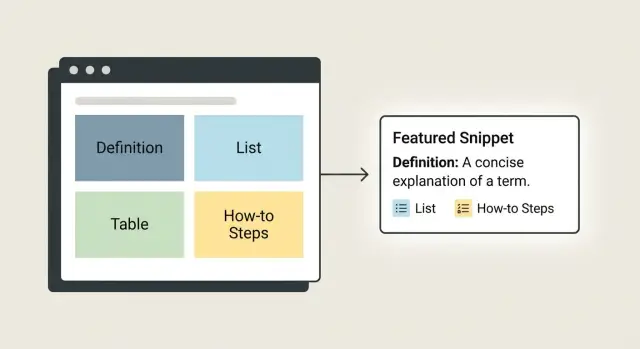
A featured snippet is the short answer box Google sometimes shows above the normal results. It can appear as a paragraph, a list, a table, or a set of steps. The goal is simple: answer the question fast, without forcing a click.
The pages that win aren’t always the ones with the “best” writing. Google is trying to pull a clean, self-contained block that matches the query. If your answer is buried in a long story, split across multiple sections, or padded with side notes, it’s harder to extract.
Formatting is what makes extraction easy. Clear headings tell Google what a section is about. A tight definition paragraph gives it a ready-made snippet. A numbered list gives it steps. A simple table gives it comparisons.
A few choices you can control on every page:
- Put the direct answer immediately under a clear heading.
- Keep the key answer short (often 1 to 3 sentences) before adding detail.
- Match the format to the question (definition, list, table, steps).
- Use consistent labels (same units, dates, categories).
What you can’t fully control is competition. Another page may have stronger authority or a slightly better match for the query. Your advantage is making your page the easiest one to quote.
Example: for “What is a cash flow statement?”, a crisp definition followed by a short list of what it shows is easier to lift than a long intro about accounting history.
Pick the snippet type before you write
Google often rewards pages that answer a question in the same shape it already prefers. Before you draft, decide what snippet format you’re aiming for.
Search your exact question and scan the top results. If you see a short definition near the top, Google is leaning toward a paragraph snippet. If you see steps, it likely wants a how-to. If you see comparisons, it often pulls a table.
Common snippet types:
- Paragraph: a 1 to 2 sentence explanation shown as a single block
- List: bullets or numbered items pulled from headings or list formatting
- Table: rows and columns used for prices, specs, sizes, or pros/cons
- How-to: numbered steps, usually with action verbs ("Choose", "Add", "Check")
Match your opening format to what Google already shows. If the current snippet is a list, you can still add a one-line definition, but the main answer should be a clean list. If the snippet is a paragraph, don’t lead with a big table.
Avoid forcing the wrong type when the query clearly demands a definition, when the answer varies by model or region (table fits better), or when a single list would be misleading.
Definition snippets: the paragraph pattern that works
A definition snippet is usually a short paragraph that answers “What is X?” in plain language. Put the definition directly under a heading that uses the exact term so Google can match the question to the answer quickly.
Write it like you’d explain it to a smart friend. Aim for 1 to 2 sentences, and treat 40 to 60 words as a good starting range. Use simple words first, then add a little context in the next paragraph.
A pattern that holds up:
- Start with “<Term> is …” and include the exact term in the first sentence.
- Keep it concrete (what it is, not why it’s great).
- Add one clarifier (who it’s for or when you use it).
- Save examples and edge cases for the next paragraph.
Example (snippet-style definition):
What is a definition snippet? A definition snippet is a short answer box in search results that pulls a clear explanation from a page and shows it above the normal listings. It’s most common for “what is” questions and works best when the definition sits right under a matching heading.
If you publish definitions at scale, consistency matters more than flair. Tools like GENERATED (generated.app) are useful here because you can keep the same opening pattern across many pages, then polish each draft to sound natural.
List snippets: bullets and numbered lists done right
List snippets tend to win when the searcher wants options or quick steps. Google can lift a clean set of items, but only if the list makes sense on its own.
Start with a single setup sentence that includes context and scope. For example: “Here are 6 ways to reduce cart abandonment for a small ecommerce store.” If the snippet appears out of context, that one line keeps it readable.
Use numbered lists when order matters (steps, rankings, timelines). Use bullet lists when order doesn’t matter (types, ideas, tools).
Keep items parallel and consistent. Pick a style (all verbs or all nouns) and stick to it. Don’t mix long explanations with tiny fragments.
- Add a guest checkout option (no account required)
- Show delivery costs early (not only at checkout)
- Offer one-click support (chat or callback)
- Reduce form fields (name, email, address only)
- Display trust signals (returns, warranty, secure payments)
Aim for 5 to 8 items when it truly fits the query. Don’t pad with “nice to have” points.
Also, put qualifiers inside the items when they matter. “Email users” is vague; “Email users within 1 hour” is extractable.
Table snippets: make comparisons easy to extract
Table snippets work best when readers are choosing between options, comparing prices, or scanning differences. Your job is to make the comparison obvious enough that Google can lift it without guessing.
Add a one-sentence lead-in that says what the table shows and who it’s for. Keep tables small and clean: 2 to 4 columns is usually enough. Avoid merged cells and “creative” layouts.
The table pattern that usually wins
Use headers that match the words people search. If the query is “X vs Y,” name the columns “X” and “Y,” not “Option A” and “Option B.” Keep units consistent across the row.
| Snippet need | Best column headers | Cell style |
|---|---|---|
| Compare options | Feature, Option 1, Option 2 | Short phrases, no full sentences |
| Show pricing | Plan, Price (USD/month), Limits | Numbers with the same format |
| Pick a tool | Tool, Best for, Notes | One clear claim per cell |
Quick checks before you publish
Ask two questions:
- Would the meaning still be clear if someone saw only the lead-in sentence and the table?
- Are headers and cells plain, specific, and consistent (including units)?
If you generate content through an API, reuse the same table template across pages. A predictable structure makes tables easier to keep clean.
How-to snippets: step-by-step structure readers trust
A good how-to snippet starts with a plain promise: what the reader will finish. Put that promise right under the heading in one sentence.
Before the steps, add a short prerequisites block so inputs are clear:
- What you need (tools or accounts)
- Time (a realistic range)
- Input (info or files required)
Then write the steps as a numbered list. Use action verbs. Keep each step to one clear action. Put explanations after the list, not inside the steps.
- Open your website CMS and select the page or post you want to update.
- Add the new content (or edit the existing section) and save your draft.
- Check the page title, H2s, and the first paragraph to confirm they match the page’s main question.
- Publish the update and confirm the page is visible to visitors.
- Request indexing using your usual method.
Notes (optional)
If a step has alternatives, pick one default path in the steps and mention the alternative here. If a parameter matters (like a file size limit), include the exact number so the instruction stays specific.
Headings and layout: help Google find the answer fast
If you want a page to win a snippet, treat headings like signposts. A clear layout makes it easier for Google to spot the question and grab the answer.
Start with one H2 that matches the search question as closely as you can, then place the direct answer immediately under it. After that, add supporting detail.
Keep heading levels consistent. Use H2 for the main question and H3 for supporting parts. If a section starts doing two jobs, split it.
A simple structure that works:
- H2: the exact question
- First paragraph: the answer in 1 to 2 sentences
- Next paragraph: one clarifier (who it’s for, when it applies)
- Optional H3s: examples, edge cases, quick tips
Whitespace matters. Short paragraphs (1 to 3 sentences) and clean spacing help both readers and extraction.
A small layout example
If your H2 is “How do I format a list snippet?”, your first line should be the direct answer. Put the list immediately after, not three paragraphs later.
Optional: a mini FAQ (only if it stays sharp)
Can I add multiple questions under one H2? Better not. One question per H2 keeps the page easy to scan and easier to extract.
Should I add an FAQ section everywhere? Only when you can answer in plain language in 1 to 2 sentences per question. Otherwise it adds noise.
Write for extraction: clarity beats cleverness
Featured snippets reward pages that make the answer easy to copy and easy to trust. If your writing needs a long setup, jokes, or “wait for it” phrasing, Google often skips it and grabs a cleaner answer from someone else.
Put the answer first, then add detail. A reliable pattern is:
- one clear sentence that answers the question
- one short support line that adds a condition, range, or definition
Make sure the answer block can stand alone. Avoid vague references (“this”, “it”) without a clear noun. Include units. Define any necessary jargon in the same paragraph.
A quick self-check:
- Can someone understand the answer in 10 seconds?
- Are key numbers and units included?
- Would the meaning stay the same if this paragraph was shown by itself?
- Is the answer visible as text (not only inside an image)?
Concrete example:
If the query is “How long should a blog post intro be?”, don’t start with a story. Start with: “A blog post intro should be 2 to 4 sentences (about 40 to 80 words) so readers reach the main point quickly.” Then add: “If the post targets a featured snippet, place the definition or steps immediately after the intro.”
Common mistakes that block snippet eligibility
Most snippet losses happen because the page makes it hard for Google to extract one clean answer.
A common cause is trying to answer too many questions at once. You end up with several half-answers, none clear enough to quote. Pick one primary question per section and make the first 40 to 60 words stand on their own.
Formatting mistakes matter too. A “list” that’s really a paragraph with commas won’t behave like a list. Steps with commentary inside each step can stop Google from using it as a how-to.
Frequent blockers:
- Mixing formats (a definition split across multiple paragraphs, a list that reads like prose)
- Stuffing the answer with keywords, disclaimers, and endless “it depends”
- Vague items like “consider your needs” or “do your research”
- Burying the answer under long intros or promotional copy
If you use a tool that generates content and CTAs (including GENERATED), put the direct answer first and add calls to action after the helpful block.
Quick checklist before you publish
A fast “snippet readiness” pass usually catches the issues that matter.
The 60-second snippet check
- Does a clear question appear in a heading that matches what people search?
- Is the direct answer placed immediately under that heading?
- Does the answer match the snippet type you want (short paragraph, list, steps, simple table)?
- Are list items or steps consistent in grammar and kept short?
- Can a reader understand the answer in 10 seconds without scrolling?
If you fail any item above, fix formatting first. Then read the answer block out loud. If it sounds tangled, it’s hard to extract.
Add detail without harming the extractable answer
Keep the “answer block” tight, then support it right below with a few lines of context: one example, one caveat, or one tip that prevents mistakes. Avoid clutter immediately after the answer.
A realistic example: one topic, four snippet formats
You can cover the same core topic in different snippet-friendly ways by matching format to query.
For “What is a content brief?” (definition intent), place a tight definition right under the main heading:
A content brief is a short document that explains what a piece of content should cover and why it matters. It gives writers and reviewers a shared plan for topic, audience, structure, and success criteria.
Then add a short list of the parts readers expect:
- Goal (what the content should achieve)
- Audience (who it’s for)
- Core message and angle (what to emphasize)
- Outline (the sections to include)
- Sources and constraints (tone, length, deadline)
For “Content brief template” (template intent), a table is often easier to extract and copy:
| Section | What to include | Example |
|---|---|---|
| Goal | Outcome and metric | Drive 500 newsletter signups in 30 days |
| Audience | Role, pain points, reading level | New founders, beginner-friendly |
| Outline | H2s and must-answer questions | H2: Pricing, H2: Setup steps |
| Sources | References and internal notes | Use product docs and 2 competitor pages |
If you publish both, use one page per intent. The definition page should lead with the 2-sentence answer; the template page should lead with the table.
Next steps: build a repeatable snippet-first workflow
Snippets are usually won by one clean, easy-to-quote answer block. The fastest path is to turn snippet work into a small routine.
Start with pages that already get impressions. They’re often the easiest targets because Google already understands the topic and is willing to show the URL.
A monthly workflow
Pick 5 to 10 pages where you rank on page one or two for question-style queries or comparisons. Then update only the part Google would quote:
- Choose one likely snippet type per query (definition, list, table, how-to).
- Rewrite just the answer block (around 40 to 60 words for definitions, 5 to 8 items for lists, 3 to 6 rows for tables).
- Place the answer directly under a heading that matches the query.
- Leave the rest alone unless it blocks clarity.
Once you get a few wins, document templates for each snippet type so publishing stays consistent.
If you’re producing content at scale, GENERATED (generated.app) can help you generate and polish drafts in consistent formats, and deliver them via API so the structure stays steady across your site.
Frequently asked questions
What is a featured snippet, and why does formatting matter for it?
A featured snippet is the short answer box that can appear above regular search results. Google pulls it from a page when it can extract a clear, self-contained answer that matches the query closely.
Where should I place the direct answer on the page?
Put the direct answer immediately under a heading that matches the question. Keep that first answer block short and complete, then add supporting details after it so Google can quote the clean part without extra noise.
How long should the “snippet-ready” answer be?
Aim for 1–3 sentences that fully answer the question, often around 40–60 words for definitions. If the topic needs more nuance, add it in the next paragraph instead of stretching the first answer block.
How do I choose between a paragraph, list, table, or how-to format?
Check what Google is already showing for your exact query and match that shape. If results lean toward steps, lead with a numbered process; if they lean toward comparisons, lead with a simple table; if they lean toward definitions, lead with a tight paragraph.
What’s the best structure for a definition snippet (“What is X?”)?
Use a heading that includes the exact term and start the first sentence with “X is …” so the definition is unambiguous. Keep it concrete, then add one clarifier about when or why someone would use it in the next paragraph.
How do I write list snippets that Google can extract cleanly?
A list snippet works best when each item makes sense on its own and the items follow a consistent style. Add a brief setup sentence right before the list so the extracted list still has context when shown by itself.
What makes a table snippet more likely to be used?
Keep tables small, with clear headers that match the words people search, and keep units consistent across rows. Add one short lead-in sentence before the table so someone understands what it compares even if they only see that sentence and the table.
How should I format a how-to section for snippet visibility?
Write steps as a true sequence of actions, with one clear action per step and minimal commentary inside the steps. Put prerequisites and extra notes outside the step list so the step block stays clean and quotable.
What heading and layout mistakes usually prevent snippet selection?
Use one primary question per H2 and place the answer right under it. Keep heading levels consistent, avoid combining multiple questions under one heading, and use short paragraphs so the key block is easy to find and extract.
Should I add CTAs or use content tools when optimizing for featured snippets?
Put the helpful answer block first and place CTAs after it so the quote-worthy content isn’t interrupted. If you publish at scale, a tool like GENERATED can help you keep the same proven formatting patterns across pages while still polishing wording to sound natural.