What SERP intent mapping is and why it matters
SERP intent mapping is the practice of matching a search query to what the searcher is trying to do, then shaping your page to fit that goal. You look at the current results on the search page (the SERP), spot the dominant intent, and build content that meets it.
It matters because ranking by itself doesn’t mean much if the page solves the wrong problem. A page can sit on page one and still disappoint if it answers a different question, uses the wrong format, or pushes the wrong next step.
Take a query like “best project management tools.” Most people want comparisons, tradeoffs, and pricing signals. If your page is a deep how-to guide with no clear recommendations, many readers will leave even if you rank.
Mismatched intent often shows up as quick exits, short time on page, and weak clicks on your calls to action. Sometimes the content is good, but the CTA jumps too far ahead. Asking for a demo on a “what is…” query can feel pushy, so people ignore it.
When your structure and CTA match the query, a few benefits follow:
- Readers find what they came for and keep going.
- More people take the next step because it feels natural.
- You make clearer decisions about what to include, what to skip, and what to put first.
Intent mapping also makes publishing more repeatable. If you produce content at scale, it helps you avoid templates that feel generic and don’t convert.
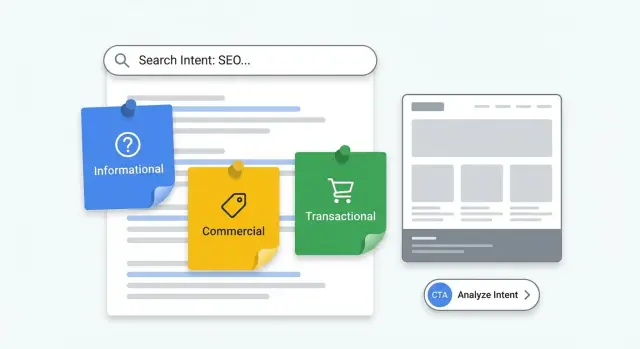
The main intent types (and how they show up in queries)
People search with different goals. If your page matches the reader’s “next step,” it usually performs better.
Informational intent: “help me understand”
Informational queries are about learning. The searcher wants a clear answer, a definition, or steps to follow. Common clues include “what,” “why,” “how,” “guide,” “examples,” and “template.”
Someone searching “what is search intent classification” isn’t looking to buy yet. They want a clean explanation, the key terms, and a simple framework.
Commercial intent: “help me choose”
Commercial queries sit between learning and buying. The searcher is comparing options and wants evidence, tradeoffs, and guidance. These often include “best,” “top,” “vs,” “alternatives,” “reviews,” “pricing,” or “for [audience].”
A search like “best SEO content structure tool” usually means the person is building a shortlist and looking for credible comparisons.
Transactional intent: “help me act now”
Transactional queries signal that someone is ready to do something: buy, sign up, book, install, or download. They often include brand names and action words like “buy,” “subscribe,” “trial,” “demo,” “download,” “coupon,” or “near me.”
A quick way to think about it:
- Informational: “how to,” “what is,” “examples,” “checklist”
- Commercial: “best,” “vs,” “review,” “alternatives”
- Transactional: “pricing,” “free trial,” “sign up,” “download”
Mixed intent is common. For example, “best keyword research tool for beginners” is mostly commercial, but many searchers still want basic definitions and a quick how-to before they compare tools. In those cases, answer the basics fast, then move into comparison and next steps.
How to read a SERP in 5 minutes
The fastest way to map intent is to stop guessing and look at what the SERP is already rewarding. Page one is a cheat sheet for the kind of page you should build.
A quick 5-minute scan
Open an incognito window and search the query. Then check a few things in order:
- Top results: Are they long guides, category pages, product pages, tools, or videos? One pattern usually dominates.
- SERP features: Featured snippets often point to informational intent (and a need for a crisp definition or short steps). Shopping blocks and heavy ads usually lean commercial or transactional. A local pack suggests “near me” or service intent.
- Title phrasing: “How to,” “what is,” and “examples” lean informational. “Best,” “top,” and “vs” lean commercial. “Buy,” “pricing,” “book,” and “download” lean transactional.
- Page format: If most winners use comparison tables, calculators, templates, or tools, readers expect something usable, not just text.
- Freshness vs depth: If top results are mostly from the last 6-12 months, freshness may matter. If older, detailed pages still rank, depth and clarity likely matter more.
Example: search “email marketing software.” If you mostly see “best tools” lists with pros and cons, you’re in commercial research territory. A pure glossary-style definition will feel thin, even if it’s well written.
Step-by-step process to map intent to content
Start with a simple keyword list, then group phrases that clearly point to the same topic. A spreadsheet is enough as long as you can sort, tag, and keep notes.
For one group, open the SERP and label the dominant intent you see most often: informational, commercial, or transactional. You’re not guessing what Google wants. You’re observing what it already rewards.
Next, capture two details that usually decide page shape quickly:
- Format: what type of page ranks (guides, list posts, product pages, comparison pages, videos).
- Angle: the promise behind the page (beginner-friendly, “2026 update,” “for small teams,” “cheap vs premium”).
Keep the process simple:
- Pick one query group and confirm the dominant intent from the top results.
- Write down the winning format and angle in one line.
- Choose the best page type to compete (blog post, landing page, comparison page).
- Write an intent statement: “This page helps [who] do [goal] and answers [top questions].”
- Decide one primary action for the reader.
Keep intent statements tight. For “best email marketing tool for nonprofits,” a strong intent statement is: “Help nonprofit marketers compare tools quickly, with pricing, key features, and pros/cons.” That points you to a comparison page, not a how-to guide.
Finally, do a quick alignment check: does the page type match what ranks, and does the primary action match the reader’s mindset? If someone searched “how to write a meta description,” a hard “buy now” CTA will feel off. A softer next step like “get a checklist” fits better, and you can still offer a product option later.
Turn intent into a page outline that fits the SERP
A good outline isn’t just what you want to say. It’s what the current results prove people want, plus one extra layer of clarity.
Start with the SERP’s common shape
Open a few top results and note what repeats: the sections, the order, and how quickly they answer the question. Then build an outline that hits those expectations early.
Common structures by intent:
- Informational: answer early, define key terms, then give steps or a simple framework with a quick example.
- Commercial: show the options, explain criteria, compare (a small table can help), and address objections with short FAQs.
- Transactional: lead with the outcome and benefits, add proof, give pricing context, and remove friction with clear setup and support details.
CTAs should feel like the next logical step, not an interruption. A useful rule: place the first CTA right after you’ve delivered the page’s main promise (definition, comparison takeaway, or offer summary). Add another near the end for readers who needed more detail.
When intent is split across results
Sometimes the SERP is mixed, like half guides and half product pages. Don’t cram everything into one URL. Pick one primary intent, then add a small bridge for the other.
Example: an informational guide can include a short “Ready to choose a tool?” section with 2-3 selection criteria and a soft CTA. That keeps the page focused while still helping people who are further along.
Choosing CTAs that match intent (without being pushy)
A good call to action feels like the next step, not a detour. When the CTA matches what the searcher is trying to do right now, people click more and bounce less.
Think in steps, not pressure. Someone reading a beginner guide wants help, not a purchase page. Someone comparing tools wants clarity and proof. Someone searching “price” wants a clean path to start.
Practical CTA choices by intent:
- Informational: checklist, template, short email course, or a “save the steps” download.
- Commercial: feature overview, short demo, real example, or a plan comparison.
- Transactional: start a trial, book a call, choose a plan, or create an account.
Match the wording to the query language. If people search “best,” they respond to “compare,” “see options,” and “what’s included.” If they search “how to,” use “copy the template” or “download the checklist.” Avoid sudden jumps like “Buy now” on a tutorial page.
How many CTAs is reasonable? For most pages, one primary CTA repeated a couple of times (near the top, mid-page, and near the end) is enough. If you add a second CTA, keep it lower-commitment.
How to measure if your intent mapping is working
Measure results by intent group, not just by page. A “best X” query set behaves differently than “buy X,” so judge each group against the job it’s supposed to do.
Start with search data. In Search Console, compare before and after for pages that target the same intent. Look for movement that fits that intent.
Focus on a few signals:
- Queries: Are you gaining impressions for the right wording, or drifting into unrelated terms?
- Position: Are you climbing for the main intent terms, not just long-tail leftovers?
- CTR: If rankings rise but CTR stays flat, your title and snippet may not match what the SERP is promising.
- New queries: Are you picking up related questions that confirm you covered the topic well?
Then validate on-page behavior. If the page matches intent, people usually scroll further and interact more.
A simple check:
- Scroll depth: do most readers reach the section that answers the main question?
- CTA clicks: are people using the next step you offered?
- Conversions: for commercial or transactional intent, do you see sign-ups, demos, or purchases?
If people bounce fast or CTR is low, the intro and promise are usually the first fix. If people scroll but don’t act, your structure and CTA may be misaligned, or the offer is showing up too early.
Run small tests one at a time: tweak the headline, move the CTA, or add a short FAQ that mirrors common SERP questions. Keep the rest stable for a couple of weeks so you can see what actually moved.
A simple example: one topic, three intents
Imagine you sell project management software. You look at one keyword set around the same theme: “project management software.” The words around the query usually reveal what page people expect.
A clean split looks like this:
- Informational (“what is project management software”, “how does it work”): a plain-language explainer with a definition, who it’s for, and a quick “how it works.”
- Commercial (“best project management software”, “top tools for small teams”): a comparison page with selection criteria, a simple table, and deal-breakers.
- Transactional (“project management software pricing”, “free trial”): a pricing and sign-up focused page that answers cost questions fast and removes distractions.
You can reuse helpful parts without making pages feel duplicated. Keep one core definition (same meaning, different wording), reuse a few screenshots, and maintain a shared FAQ library. Then tailor the intro, headings, and examples to the intent.
CTAs should change with intent. On the explainer, “See features” or “Read the guide” often fits. On the comparison page, “Compare plans” or “Watch a quick tour” fits better. On pricing pages, go direct: “Start free trial” or “Create account.”
Often you’ll see CTR improve first because your title and snippet match the query. Rankings tend to follow as search engines see stronger alignment. Conversions usually come last, once the right visitors land on the right page.
Common mistakes that slow rankings
Most ranking delays happen when the page answers a different problem than the one reflected in the SERP. Intent mapping works only if you let the results define what “good” looks like.
A common trap is labeling intent from the query wording alone. Some phrases sound informational but still trigger product pages, pricing pages, and “buy” results. If the top results are transactional, publishing a how-to article puts you in the wrong race from day one.
Another mistake is pushing strong CTAs too early. On informational pages, people want clarity first. If the first screen is “Book a demo” or “Buy now,” many will leave.
Trying to force one page to cover every intent is also a slow path. A single URL that mixes “what is X,” “best X tools,” and “buy X today” usually feels unfocused. It confuses readers and makes it harder for search engines to understand what the page should rank for.
A few red flags:
- Your page type (blog, category, landing page) doesn’t match the top results.
- The first paragraph sells before it helps.
- You’re targeting three intents with one title and one CTA.
- You copied headings but ignored what the results emphasize (price, steps, reviews).
- Your CTA asks for a big commitment when the query asks for basics.
Example: if “email marketing software pricing” shows mostly pricing pages, a long guide titled “What is email marketing?” will struggle.
Quick checklist you can use for every query set
Use this routine before you write or update anything:
The 5-minute checklist
- Scan the top results and decide the dominant intent. Look at the first five pages and note what they are.
- Choose one page type and format that fits the winners.
- Write a one-sentence intent statement plus one main action.
- Draft an outline that matches common sections you see, then add one useful angle that stays relevant.
- Add support that reduces doubt: short FAQs based on common SERP questions, plus proof like screenshots, numbers, or mini case stories.
After you write, do a last pass: does every section help the reader finish the job they came to do, without pushing them into the wrong next step?
Monthly review by intent group
Once a month, group tracked queries by intent and review results together. Look for patterns like “informational pages get clicks but no sign-ups” or “commercial pages rank but don’t convert.”
When a CTA underperforms, don’t start by changing button text. Re-check the intent statement and page type first.
Next steps: make it repeatable and scale it
Speed comes from running the same smart checks the same way every time. Start with queries already showing up in Search Console or your rank tracker. Sort by impressions, then prioritize keywords sitting just outside the top results (often positions 6-20). Those are often faster wins because Google is already testing you.
To keep intent mapping consistent, build a small set of templates tied to intent, then adjust per topic:
- Informational: clear definition, quick answer near the top, short FAQ, soft CTA
- Commercial: comparison criteria, pros/cons, proof, CTA to compare plans or view a demo
- Transactional: pricing context, trust signals, objections, direct CTA to start
Store decisions in a lightweight doc or spreadsheet so you don’t re-litigate the same questions every time: query, SERP intent, chosen page type, primary CTA, and review date.
If you’re publishing at scale, it helps to use a system that keeps structure, CTAs, and tracking consistent across pages. GENERATED (generated.app) is one example: it’s an all-in-one platform for generating SEO-focused content and serving it via API, with CTA generation and performance tracking so you can see what works by intent group.
A simple 30-day rhythm keeps you moving:
- Update one existing page each week based on an intent mismatch you found.
- Publish one new page each week for a high-impression query with no perfect match yet.
- Check results weekly (rank movement, CTR, conversions), then repeat what worked.
Frequently asked questions
What is SERP intent mapping in plain English?
SERP intent mapping is matching a query to what the searcher is trying to accomplish, then shaping your page to deliver that outcome. It matters because a page can rank and still fail if it uses the wrong format, answers the wrong question, or pushes a next step that feels too early.
Why should I look at the SERP instead of guessing intent from the keyword?
Because the SERP shows what is already being rewarded for that query. If page one is full of comparison lists and your page is a glossary definition, you’re competing with the wrong type of content, even if your writing is strong.
How do I read a SERP in 5 minutes without overthinking it?
Open an incognito search and scan the top results for the dominant pattern: guides, comparisons, product pages, tools, or videos. Then check titles for wording like “how to,” “best,” or “pricing,” and notice SERP features like snippets (often informational) or heavy ads/shopping signals (often commercial or transactional).
What are the main intent types, and how do I spot them fast?
Most queries fall into informational (learn), commercial (compare), or transactional (act now). A quick rule is: if the query includes “how/what,” it’s usually informational; “best/vs/alternatives” is usually commercial; “pricing/trial/sign up” is usually transactional, but you still confirm by checking the actual results.
What should I do when the SERP shows mixed intent?
Pick one primary intent to win the main query, then add a short “bridge” section for the secondary intent. For example, an informational guide can include a brief comparison tip and a soft next step, but it shouldn’t turn into a full pricing or sales page.
What’s the simplest way to turn intent into a content plan?
Start by writing one tight intent statement like: “This page helps [who] do [goal] and answers [top questions].” Then choose the page type and structure that best fits the SERP winners, and decide one primary action you want readers to take after you’ve delivered the main promise.
Where should the CTA go so it matches intent and doesn’t feel pushy?
Place the first CTA right after you’ve delivered the page’s main promise: a clear definition for informational pages, a comparison takeaway for commercial pages, or an offer summary for transactional pages. Keep the ask proportional to the query so it feels like the next step, not a jump to a big commitment.
How can I tell if my intent mapping is working?
Start with Search Console signals by intent group: impressions, position, and CTR for the terms you actually want. Then validate behavior on the page with scroll depth and CTA clicks, and for commercial/transactional pages, track downstream conversions like trials, sign-ups, or demo requests.
What are the most common mistakes that slow rankings with intent mapping?
Common issues are choosing intent from the keyword wording without checking the SERP, using a page format that doesn’t match what ranks, and pushing strong CTAs too early on informational queries. Another frequent mistake is trying to cover “what is,” “best,” and “pricing” on one URL, which usually makes the page feel unfocused.
How do I decide whether freshness or depth matters more for a query?
If freshness dominates the top results, update cadence and recent examples matter, so your page should show it’s current. If older detailed pages keep winning, depth and clarity are usually more important than constant updates, so focus on a stronger explanation and better structure.