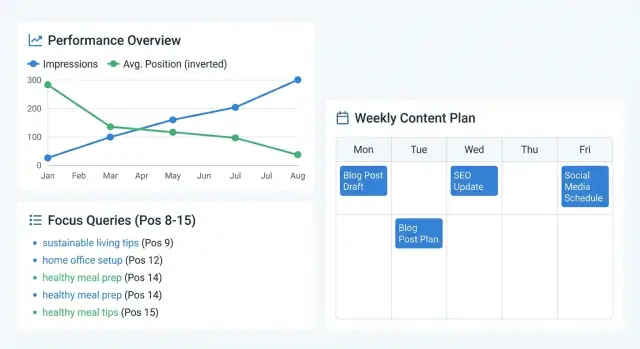
Why impressions and positions are a content goldmine
Impressions are a quiet signal that your site is already being considered. Even if clicks are low, an impression means Google showed your page for a query. That’s proof there’s a real overlap between what you published and what people are searching for. It beats guessing topics from scratch.
Average position adds the missing context. A page sitting at position 35 usually needs real work. A page sitting just outside the top results often needs only small improvements to move up and start earning clicks.
“Near page 1” usually means an average position around 8 to 20. These are queries where you’re already in the conversation. A clearer title, a faster answer, or one stronger section can push you into the results people actually open.
This is often the fastest path to growth because you’re not trying to win a brand-new keyword with zero history. You’re taking existing demand (impressions) and improving your share of it. If a post gets 2,000 impressions a week at position 12, moving to position 6 can turn “almost no traffic” into steady clicks without publishing anything new.
A Search Console content calendar works best when it balances four weekly actions: publish something new, update pages that already get impressions, check the metrics, and log what changed so you can repeat what works.
Set up your baseline in Search Console
A content calendar based on Search Console only works if your starting numbers are consistent. Before you pick topics, decide what “normal” looks like for your site so week-to-week changes actually mean something.
Choose a reporting window you can trust
Pick one window and stick to it for your first cycle.
- Last 28 days: reacts quickly, great for weekly work.
- Last 3 months: steadier if traffic is small or seasonal.
- Compare mode: helpful for context, but don’t build your whole plan on comparisons.
If you publish often, 28 days usually keeps you honest. If you publish rarely, 3 months is less jumpy.
Lock down your filters (so you’re not mixing signals)
Next, decide what you’re measuring.
- Country: choose your main market if you serve multiple regions.
- Search type: most plans start with Web. Track Images or Video separately if they matter.
- Brand vs non-brand: create a simple brand filter (company name, product name, common misspellings). Brand clicks often rise from PR or loyal users, not content work.
- One goal for this cycle: pick one focus, like more clicks (CTR), better rankings (position), or wider coverage (more queries/pages).
Example: if a query has high impressions but low clicks, your goal is usually CTR. If it sits around positions 8 to 15, your goal is usually rankings. Write that goal at the top of your weekly notes so every task supports it.
If you use an automated publishing tool like GENERATED, keep the same baseline settings across every content batch so your tracking stays clean.
Find near page 1 queries worth acting on
The quickest wins usually sit just outside the top results. Start with queries that already get shown in Google but aren’t quite earning clicks.
In Search Console’s Performance report, look for queries with meaningful impressions and an average position around 8 to 20. These terms are close enough that small improvements can move the needle.
Then look for “quiet opportunities”: queries where impressions are rising but clicks stay flat. That often means Google is testing your page more, but people are skipping it. Common reasons include a vague title, mismatched intent, or a page that answers the question too late.
To avoid busywork, use a simple filter:
- Meaningful impressions and position 8 to 20 (or impressions rising in the last 28 days)
- CTR lower than other closely related queries
- Intent matches what you want to be known for (and can genuinely serve)
- Not tied to an outdated year or trend
- You can clearly answer it better than what’s already ranking
Before you add anything to the calendar, sanity-check intent. If the query is for the wrong audience, the wrong product, or a problem you don’t solve, skip it even if the numbers look great. Otherwise you’ll attract clicks that bounce.
Finally, group similar queries so they live on one strong page instead of being scattered across thin pages. A simple rule: if the searcher would be happy landing on the same answer, keep them together.
Map queries to pages without creating duplicates
A query should usually map to one main page. If multiple pages chase the same term, you split signals and make it harder for any of them to rank. This is where the calendar starts to feel organized: every query has an “owner” page.
Ask one question: if someone searches this phrase, which page would they be happiest to land on? If you already have that page, update it instead of creating a new one.
Create a new page only when the intent is clearly different. For example, “best running shoes for flat feet” (a comparison guide) shouldn’t be forced onto a category page called “Running Shoes.” But “best running shoes for flat feet women” is often just a variant that belongs in the same guide.
When more than one page could fit, choose the target like this:
- Pick the page that matches the intent best (guide vs product vs definition).
- Prefer the page already getting impressions for the query (Google is already testing it).
- Use clicks as a tie-breaker if impressions are similar.
- If both pages are weak, choose the one you can improve faster (clear structure, up-to-date info).
Watch for cannibalization, where two pages compete for the same query. Signs include the top URL switching week to week, two pages sitting around positions 8 to 20 for the same term, or impressions rising while clicks stay flat.
Once you pick the owner page, assign one primary query, then 2 to 4 close variants that naturally fit in headings and sections. If a variant needs a different answer, that’s your signal to plan a separate page instead of cramming everything into one.
Prioritize with a simple scoring system
Impressions are a strong hint that Google already sees your page as relevant. They’re not a promise of traffic. A query can get lots of impressions because it appears low on page 2 for many people, or because it triggers in places where users rarely click.
To turn the signal into a plan, use one simple score for each query-page pair:
Score = (Impressions x Relevance) / Effort
Keep the math rough. The point is fast, repeatable decisions, not perfect forecasting.
- Impressions (1-5): 1 = low, 5 = very high for your site.
- Relevance (0-2): 0 = not really what you offer, 1 = related, 2 = exact match.
- Effort (1-3): 1 = quick update, 2 = medium, 3 = deep rewrite.
Label each item as either a quick update or a deeper rewrite. Quick updates often deliver the highest ROI because they move near-page-1 keywords with small edits.
- Quick update (1-2 hours): title tweak, intro rewrite, add a missing section, improve internal linking.
- Deeper rewrite (half day+): change the page angle, rebuild structure, merge thin pages, add new examples.
Keep a small parking lot for ideas that score well on impressions but have unclear intent or need more research. Review it monthly so it doesn’t turn into a graveyard.
If you track this in a spreadsheet or a tool like GENERATED, store the score, the effort label, and a one-line next action. That’s enough to pick next week’s tasks in minutes.
Turn priorities into a realistic weekly publishing plan
A plan only works if it fits your week. The goal isn’t to publish more. It’s to ship the few changes most likely to move “almost there” pages over the line.
Start the week by choosing targets when your head is clear. Review the last 7 to 28 days of impressions and positions, then pick one main focus and a short list of quick wins. Keep the list small enough that you’ll actually finish it.
A simple weekly rhythm for many small teams:
- Early week: pick 1 priority page and 2 to 4 refresh candidates
- Midweek: publish 1 new post or expand 1 key page
- End of week: ship quick refreshes (titles, missing sections, FAQs, examples)
- Weekly: reserve a short slot for technical cleanup
Technical cleanup is easy to ignore, so schedule it like a real task. Use a fixed block (30 to 60 minutes) to fix broken pages, remove thin sections, merge duplicates, and refresh internal links between related pages.
Match the cadence to your team size. If you’re solo, aim for one “big” change per week and two small refreshes. With two people, one big change plus four to six refreshes is usually realistic.
A repeatable page update checklist (what to change first)
When a page is sitting in positions 8 to 20, focused edits often move it more than a full rewrite. Use the same order each time so updates stay fast and results are easier to compare week to week.
Before you edit, open the page and read it like a first-time visitor. Ask: what question do I think this page will answer, and does the first screen confirm that?
Work top to bottom:
- Rewrite the intro for the main intent. Make the first 2 to 3 sentences match what the query promises. If the query is “template,” show a template early. If it’s “how to,” state the steps you’ll cover.
- Add the missing subtopics people are also searching. Pull 2 to 4 related queries from Search Console and answer them with short, tight sections.
- Fix headings for scanning. Replace vague headings with clear ones that sound like questions or outcomes.
- Add one concrete example or mini-template. A copy/paste outline, a simple table, or a short step-by-step block can do a lot.
- Refresh anything that dates the page. Update the year, screenshots, tool names, and claims that no longer hold up.
Example: if the query is “weekly content plan” and the page jumps into theory, add a simple weekly schedule near the top (Mon research, Tue draft, Wed publish, Thu update an older page, Fri measure). That single addition can better match what searchers want.
If you publish via an API workflow (like GENERATED), treat updates as small patches you can ship quickly instead of rewriting whole posts.
Common traps that waste time (and how to avoid them)
Search Console data can save hours, but only if you avoid a few predictable mistakes. Most wasted effort comes from picking the wrong targets or changing so much that you can’t tell what helped.
- Chasing big keywords that don’t fit your offer. If intent is different, you’ll fight the SERP forever. Pick terms you can fully answer, or adjust the page to match the intent.
- Creating a new page for every slightly different query. This splits attention and can cause your own pages to compete. Group close queries under one strong page and add a short section instead.
- Changing everything at once. Title, layout, intro, sections, internal links - then rankings move and you don’t know why. Make 1 to 2 focused changes per cycle, then measure.
- Ignoring titles and snippets when you’re already close. At positions 8 to 15, snippet improvements can unlock clicks without heavy rewriting. Test a clearer title with specifics and a meta description that matches the query.
- Publishing and moving on. Schedule follow-up. Set a check-in date for each updated page (7 to 14 days for early signals, 28 days for a clearer trend).
Example: from Search Console report to next week’s tasks
Imagine a SaaS blog with lots of queries sitting at positions 9 to 14. The pages are close, but they’re not getting steady clicks. This is a sweet spot because small improvements often produce visible movement.
On Monday, you open Performance, set the date range to the last 28 days, and sort by impressions. You scan for queries with an average position between 9 and 14, then note which pages show up for several related queries (a sign the page is relevant, just not strong enough yet).
Next week’s plan could look like:
- New post: “How to reduce churn in SaaS onboarding” (high impressions for “reduce onboarding churn,” but no page matches well)
- Update 1: Refresh “SaaS onboarding checklist” (ranking 11 to 13 for multiple checklist queries)
- Update 2: Improve “Product adoption metrics” (impressions for “activation rate benchmarks,” but the section is thin)
- Update 3: Clean up “Customer retention strategies” (ranking around 10 for “retention tactics,” but the title and intro don’t match the search wording)
The changes stay simple: make the page match the promise of the query. Rewrite the title and first paragraph to answer faster. Add one missing section suggested by the query. Refresh examples so they feel current. If two pages overlap, choose the owner page and adjust the other so they stop competing.
After 2 to 4 weeks, success looks like positions moving from 9 to 14 into 4 to 8, clicks rising on the same impressions, and the page earning new related queries.
Measure results and decide what to update again
After you update a page, you need a simple way to judge whether it worked. Keep the approach consistent so the calendar stays easy to run.
Stick to three metrics for the target queries: clicks, average position, and CTR. Together, they tell you whether you gained traction (position), whether the snippet is doing its job (CTR), and whether the change is paying off (clicks).
Create a before/after snapshot for every updated page. A spreadsheet note is enough: date shipped, 3 to 5 target queries, and the three metrics. Use the same date range before and after (for example, 14 days before vs 14 days after).
Pick a review cadence and don’t change it mid-cycle. Common options are 7 days for quick signals, 14 days for steadier trends, and 28 days to reduce noise. If your site has low traffic, longer windows usually give clearer answers.
Decision rules that keep you moving:
- Iterate when position improves but clicks don’t (work on title/snippet clarity).
- Iterate when CTR improves but position doesn’t (add depth, tighten intent match, improve internal links).
- Move on when position and CTR are flat after two review cycles (too competitive right now, or wrong angle).
- Double down when clicks rise and position climbs (expand what’s working and add closely related questions).
Next steps: make the calendar easy to maintain
If the calendar feels heavy, it gets abandoned. The goal is a routine you can repeat without a weekly planning meeting.
Start small. Pick one category of pages (for example, “pricing and comparison” pages) and run the process for four weeks. It keeps scope clear and makes it easier to see what actually moves impressions, clicks, and positions.
Also pick one source of truth. A spreadsheet works fine as long as everyone uses the same one. Track only what helps you decide the next actions.
A lightweight structure that stays useful:
- Page URL (or draft title if it doesn’t exist yet)
- Target query cluster (main theme, not 20 keywords)
- Owner and due date
- Status (planned, drafting, updating, published)
- Last updated + what changed (one sentence)
Automate only after the routine works
Once you can run the weekly cycle reliably, automation can save time. For example, GENERATED can help produce SEO-focused drafts, rewrite specific sections during updates, generate blog images sized for SEO, and publish content via API. It works best when your inputs are clear: target query, page goal, and exactly what needs to change.
Make maintenance a real task
One habit that keeps things manageable: each week, commit to only two additions to the calendar - one new publish and one update. If a query is sitting at position 11 to 13 with high impressions, assign a 60-minute update to the existing page instead of creating a new one. That keeps the plan realistic and makes progress easier to measure.
Frequently asked questions
What does an “impression” actually tell me in Search Console?
An impression means Google showed your page for a query, even if nobody clicked. Treat it as proof your content already matches real searches, which makes it a better starting point than guessing new topics from scratch.
What counts as “near page 1,” and why does it matter?
“Near page 1” usually means your average position is around 8 to 20. You’re close enough that targeted edits, like a clearer title or a stronger first answer, can move you into the results people actually click.
Which date range should I use when planning weekly content updates?
Use one consistent window for your first cycle so week-to-week changes are comparable. Last 28 days is good for weekly work; last 3 months is steadier if your traffic is low or seasonal.
What filters should I set so my Search Console numbers stay consistent?
Lock down the same filters each time so you don’t mix signals. A simple default is your main country, Search type = Web, and a brand vs non-brand split so brand demand doesn’t hide what your content work is actually doing.
How do I find the best “quick win” queries to target?
Start with queries that have meaningful impressions and sit around positions 8 to 20, then check whether CTR is oddly low. If impressions are rising but clicks are flat, it often means your snippet or the page’s “first answer” isn’t matching what searchers expect.
When should I update an existing page instead of creating a new one?
Usually, update the existing page that best matches the search intent and is already getting impressions for that query. Create a new page only when the intent is clearly different; otherwise you risk splitting relevance and weakening both pages.
How can I tell if my site has keyword cannibalization?
Cannibalization is when two of your pages compete for the same query, so neither wins. Common signs are the top URL switching week to week for the same term, or two similar pages both hovering in positions 8–20 while clicks don’t grow.
What’s an easy way to prioritize updates without overthinking it?
Keep it simple: Score = (Impressions × Relevance) ÷ Effort. This pushes high-demand, high-fit topics up the list while penalizing big rewrites, so your calendar fills with changes you can actually finish.
What should I change first on a page that ranks around positions 8–15?
Start by making the top of the page match the query immediately: title, first sentences, and the fastest path to the answer. Then add one missing section based on related queries, and make headings clearer so people can scan and trust the page quickly.
How do I measure whether an update worked, and what do I do next?
Track clicks, average position, and CTR for the target queries using the same before/after window each time. If position improves but clicks don’t, refine the title/snippet; if CTR improves but position doesn’t, strengthen the content and internal links; if both are flat after two review cycles, move on for now.