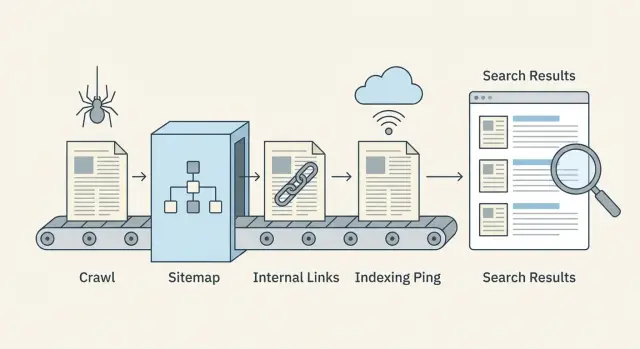
What indexing delays look like when you publish a lot
Indexing delays usually follow the same pattern: you publish, the page is live, but it doesn't show up in search for days (sometimes weeks). At low volume, that lag is easy to miss. When you're shipping dozens of URLs a day, the backlog becomes obvious because new pages stack up faster than they enter the index.
A common sign is a Search Console status like "Crawled, currently not indexed." That means a bot visited the URL, but didn't store it as a searchable result. Another pattern: only a slice of your newest pages get indexed, while older areas of the site keep performing normally.
Once you jump from 10 pages to 1,000+, crawlers have to make choices about where to spend time. If your site produces lots of similar URLs (duplicates, thin pages, parameter variants), bots can waste visits on the wrong things. The pages you actually care about end up waiting.
High-volume "crawled but not indexed" issues usually come down to a few causes:
- The page looks too similar to existing pages (reused templates, repeated intros, near-duplicate topics).
- The page looks unimportant (few internal links, buried deep in pagination).
- The page sends mixed technical signals (wrong canonical, accidental noindex, blocked resources).
- The site generates too many low-value URLs (filters, tracking parameters, faceted navigation).
- The content doesn't satisfy the query (thin, outdated, or missing key details).
A quick way to tell quality problems from discovery problems is to sample a small batch of new URLs (say 20) and ask two questions.
First: can a crawler easily discover it? Confirm the URL is in your XML sitemap, has at least one prominent internal link, returns 200 OK, and isn't blocked by robots rules.
Second: if discovered, is it worth indexing? Look for real uniqueness (not a reword of an existing page), a clear intent match (it answers a real question), and enough substance (specifics and examples, not just a template).
If most of your sample fails the first question, you have a discovery system problem. If they pass discovery but fail the second, you have a quality and duplication problem. Fix the right one and the backlog usually shrinks fast.
The crawl-to-index flow in plain language
Publishing doesn't make a page instantly searchable. Search engines move it through a pipeline, and delays can happen at any step.
Discovery, crawling, and indexing (what they mean)
Discovery is when a search engine learns a URL exists. That usually happens through internal links, your XML sitemap, or an external mention.
Crawling is when a bot visits the URL and downloads what it sees (HTML, key resources, and sometimes additional linked URLs). Crawling is limited by time and attention, so some pages get visited late or rarely.
Indexing is when the search engine decides whether to store the page and show it in results, and for which queries. A crawled page is not guaranteed to be indexed.
The flow looks like this:
- Search engine finds the URL (discovery)
- Bot fetches the page (crawl)
- Page is evaluated and either stored or skipped (index)
- Rankings update over time as signals accumulate
Where delays usually happen
Most slowdowns happen before the bot reaches the page, or right after it crawls.
Discovery delays show up when new pages are orphaned (no links pointing to them) or when sitemaps are outdated.
Crawl delays often come from wasting crawls on low-value URLs (duplicate paths, faceted pages, parameter spam) or from slow server responses.
Indexing delays happen when pages look too similar to others, have thin content, send mixed signals (canonical pointing elsewhere, accidental noindex), or load key content late.
Signals you can change fast vs slow
Fast levers are mostly technical and structural: stronger internal links from already-crawled pages, accurate sitemaps, fewer crawl traps, better response times, and proactive indexing pings when they make sense.
Slower levers take time to show results: overall site quality, consistency, earned links, and longer-term engagement signals.
What to measure weekly
You don't need a complex dashboard to catch issues early. Track a small set of numbers each week:
- New URLs published vs. new URLs indexed
- Median time from publish to first crawl
- Crawl errors and slow responses (5xx, timeouts)
- Share of "Discovered, currently not indexed" and "Crawled, currently not indexed"
- Sitemap coverage: URLs in sitemap vs. URLs actually indexable
Crawl budget: stop wasting crawls on low-value URLs
Publishing at volume isn't just about creating good pages. It's also about making it easy for crawlers to spend time on the pages that matter.
Crawl budget gets wasted when bots keep finding many versions of the same thing, or lots of pages that offer little value. Typical culprits are URL parameters (sorting, tracking tags), faceted filters, tag archives, print views, and pages that barely differ from each other.
Signs you're leaking crawl budget:
- Lots of URLs that differ only by small parameters (like
?sort=or?ref=) - Filters that create endless combinations (color=, size=, brand=)
- Thin pages repeated across many URLs
- Redirect chains (multiple hops before the final page)
- Spikes in 404/500 errors or timeouts in server logs
Speed and errors directly affect how often bots come back. If your site is slow or frequently returns errors, crawlers back off to avoid wasting resources. Fixing 5xx errors, reducing timeouts, and improving response times can increase crawl frequency more than publishing even more pages.
Blocking low-value sections can help, but do it carefully. Block truly useless areas (infinite filter combinations, internal search results, calendar pages that generate endless URLs). Don't block pages you actually want indexed just because they're new. If a page should rank later, it still needs to be crawlable now.
Reduce duplicates without changing your CMS
Even if you can't easily change URL generation, you can reduce duplicate signals:
- Add canonical tags so parameter versions point to the main URL.
- Use consistent internal links that always point to the clean URL.
- Remove parameterized URLs from your XML sitemap.
- Add robots.txt rules for obvious junk patterns (only when you're sure).
- Normalize redirects so old variants resolve in one hop.
Example: an ecommerce category page might exist as /shoes, plus /shoes?sort=price and /shoes?color=black. Keep /shoes indexable and linked internally. Canonicalize the variations back to /shoes, and keep the variations out of the sitemap. That pushes crawlers toward the right page and away from loops.
Internal linking that helps new pages get discovered
When you publish a lot, internal links are your fastest discovery signal. Search engines can only crawl what they can find. If new URLs aren't linked from pages that already get crawled, they often sit unnoticed even if your sitemap is perfect.
Build clusters that naturally surface new pages
Think in topic clusters: one strong core page that stays relevant (a guide, category page, glossary term, or FAQ), plus supporting articles that answer specific questions. When you add a new supporting article, link it from the core page and from 1-2 related supporting articles. Then link it back to the core.
Example: a core page like "Email marketing basics" can link to new pieces like "Welcome email examples" and "How to clean your list." Those new pages link back to the core page, so crawlers keep moving through the cluster instead of stopping.
Use a simple new content hub
A "New content" hub page helps when you publish daily or hourly. It doesn't need to be fancy. It just needs to be easy to reach from your navigation or homepage and updated automatically.
Keep it tidy: show recent posts by topic, and avoid infinite scrolling pages that grow forever. A hub like this becomes a reliable place crawlers revisit.
Anchor text matters, but only in a common-sense way. Use clear words that describe the page ("welcome email checklist"), not vague labels ("click here"), and not keyword stuffing.
For the first week after publishing, a simple rule set works well:
- Link each new page from at least 2 already-crawled pages (a hub or category page counts as one).
- Add 1 contextual link from a closely related older article.
- Link back to the core topic page so the cluster stays connected.
- Keep link counts reasonable so important links stand out.
Watch for orphan pages (pages with no internal links pointing to them). One practical way to spot them is to compare your published URL list (or sitemap URLs) against what a site crawl reports as "internally linked." Any URL missing internal links is a discovery risk.
If your publishing system supports it, bake internal links into the publish step so new pages aren't left alone on day one.
Sitemaps that stay accurate at scale
At volume, your XML sitemap becomes less of a "nice to have" and more of a control panel. It tells search engines what changed and what matters.
What to include (and what to keep out)
Your sitemap should list only URLs you actually want indexed and that a crawler can load successfully.
Include pages that are:
- Indexable (not blocked by robots, not marked noindex)
- Canonical to themselves (or you're confident the listed URL is the canonical one)
- Returning 200 and rendering real content
Keep out faceted filters, internal search results, endless parameter URLs, duplicates, and thin pages you wouldn't want ranking. If a URL is a dead end for users, it's usually a dead end for crawling too.
How often to update when you publish frequently
If you publish daily or hourly, treat your sitemap like a living feed. Update it as new pages go live, and remove URLs that are gone or no longer indexable. Waiting a week can leave search engines crawling old inventory while missing your newest pages.
Use the lastmod field only when you can set it honestly. It should reflect meaningful content changes, not every minor edit or re-save. Inflated lastmod dates teach crawlers to stop trusting it.
Handling large sites: multiple sitemaps and a sitemap index
As your site grows, split sitemaps by type (blog posts, glossary, news) or by time (by month). Smaller sitemaps update faster, and problems are easier to spot.
A sitemap index acts as a directory that points to each sitemap file. It also helps teams assign ownership, so one person can keep the blog sitemap clean while another handles product or glossary URLs.
Sitemap hygiene checks that catch issues early
Run these checks regularly, especially after big releases:
- URLs return 200 (not 3xx, 4xx, or 5xx)
- Listed URLs match the canonical URL for the page
- Noindex pages aren't included
lastmodchanges only when content truly changes- The sitemap isn't growing with duplicate or parameter URLs
If you generate pages via an API or a CMS, automate these checks so mistakes don't scale with you.
Canonical, noindex, and robots checks before publishing
At volume, small technical slips multiply fast. A single wrong setting in a template can hide hundreds of pages from search, or flood crawlers with duplicates.
Pick one preferred URL version
Search engines want one main version of each page. Decide your preferred format and stick to it everywhere: HTTPS vs. HTTP, www vs. non-www, and trailing slash vs. no trailing slash.
If your site can be reached in multiple ways (for example, both with and without a trailing slash), you create copies that read the same. That makes discovery slower and indexing less predictable.
Canonical and indexing controls: what to verify
Canonical tags tell search engines, "This page is a copy, index that other one." They help with near-duplicates (printer pages, filtered views, very similar location pages), but they can be dangerous if applied broadly.
A common failure pattern: a new blog template rolls out and accidentally sets the canonical to the blog homepage for every post. Crawlers still fetch the pages, but indexing stalls because every page claims it's not the main version.
Before you publish a batch, spot-check a handful of new URLs:
- Canonical points to itself on normal pages (not a category page or the homepage).
- Page is indexable (no meta noindex and no
X-Robots-Tag: noindex). - robots.txt allows crawling of the URL paths used by new pages.
- Redirects land in one step (avoid chains).
- Final URL matches your preferred version (same host, protocol, and slash style).
Also look at "noise" pages. Tag, category, and paginated pages can be useful for users, but they can create endless low-value URLs if your system generates lots of combinations. That noise competes with new content for attention.
A practical rule: keep important hub pages crawlable, but prevent thin or repetitive variants from multiplying.
Step-by-step: a scalable publish and indexing workflow
Treat each batch like a small release. The goal is to ship pages that are easy to crawl, easy to understand, and immediately connected to the rest of your site.
1) Prep the batch (before you hit publish)
Run quick checks on templates and content so you don't create 200 new problems at once:
- Confirm each page returns 200 OK (no accidental 404s, redirects, or blocked rendering).
- Check title, meta description, and one clear primary heading (H1) are present and not duplicated across the batch.
- Verify canonical tags point to the correct preferred URL.
- Add structured data only if it's accurate (for example, Article for blog posts).
- Make sure pages are indexable (noindex is off, robots rules allow crawling).
If you can, stagger releases. Publishing 50 pages per day for 4 days is easier to monitor than dropping 200 in one hour, and it helps you catch template mistakes early.
2) Publish, then make pages discoverable (within minutes)
Publishing isn't the finish line. New URLs need clear paths from known pages.
After the batch goes live, focus on three actions: add internal links from relevant hub pages, update your XML sitemap, and send a responsible indexing ping (for example, IndexNow) for the new URLs only.
3) Monitor the first 48 hours (and what to do if nothing shows up)
Give search engines time, but don't wait blindly. In the first day or two, sample 10 URLs and verify they're reachable, internally linked, and included in the sitemap.
If they're still not showing up after 48 hours, prioritize fixes that unblock discovery:
- Add stronger internal links (from high-traffic pages, category pages, and recent posts).
- Remove crawl traps (endless filters, calendar pages, duplicate tag pages).
- Re-check canonicals and noindex (one wrong setting can hide an entire template).
- Confirm the sitemap contains the new URLs and
lastmodbehaves correctly. - Re-send an indexing ping only for URLs you changed or newly added.
Example: if you publish 120 glossary pages, also publish (or update) 3-5 hub pages that link to them. Hubs often get crawled first, and they pull the new pages in with them.
Proactive indexing pings (including IndexNow) done responsibly
Indexing pings are a useful nudge, not a magic switch. They help most when you publish lots of pages and want search engines to notice changes quickly, especially for time-sensitive updates (price changes, out-of-stock pages, breaking news) or when you remove URLs and want them to drop sooner.
They don't help if the page is blocked by robots.txt, set to noindex, missing internal links, or returning errors. In those cases, pings just send crawlers to a dead end.
What IndexNow does (in plain terms)
IndexNow is a simple "this URL changed" message you send to participating search engines. Instead of waiting for crawlers to rediscover changes, you provide a list of URLs that are new, updated, or removed. Search engines can then choose to crawl those URLs sooner. Indexing is still their decision, but discovery often gets faster.
Example: you update 200 older posts with new sections. Without pings, crawlers might take days or weeks to revisit all of them. With IndexNow, you can point them to the exact URLs that changed.
Keep ping batches tied to real changes:
- Newly published URLs that return 200 and are internally linked
- Updated URLs where content meaningfully changed
- Removed URLs (404/410) or redirected URLs (301) after the change is live
- Canonical URLs only (avoid variants, parameters, tracking URLs)
Noise is the fastest way to make pings pointless. Avoid re-pinging the same URL every hour, sending URLs before they're accessible, or blasting huge lists when only a few pages changed.
Common mistakes that cause indexing delays at scale
Indexing delays often aren't a search engine problem. They're usually self-inflicted. The goal is simple: make it easy for crawlers to find your best URLs, and hard to waste time on everything else.
One common trap is mass-producing pages that look different to you, but not to a crawler. If hundreds of pages only swap a city name, product adjective, or a few sentences, they can be treated as near-duplicates. Crawlers may slow down, index fewer pages, or pick a different version than the one you want.
Another crawl-budget killer is uncontrolled URL growth. Faceted filters, on-site search results, tag pages, calendar archives, and tracking parameters can multiply into thousands of crawlable URLs. Even if they aren't harmful, they compete for attention with new content.
Mistakes that show up most often:
- Publishing large batches of highly similar pages without unique value.
- Letting tags, filters, internal search, and parameters generate endless URL variations.
- Relying on the sitemap alone, without strong internal links from relevant hubs.
- Including redirecting, non-canonical, blocked, or noindex URLs in sitemaps.
- Renaming or moving URLs repeatedly right after launch, creating recrawls, redirects, and duplicate signals.
Example: a real estate blog publishes 500 neighborhood guides in a week. If each guide is mostly a template with swapped phrases, and the site also exposes infinite filter combinations (beds, baths, price, sort order), crawlers can get stuck exploring filters while the guides sit undiscovered.
Fixing this is usually less about doing more and more about tightening signals: link new pages from a few well-traveled category pages, keep sitemaps clean, and freeze URLs until pages have had time to be crawled and settled.
A quick checklist and next steps
Small issues add up fast at high volume. These checks help keep new URLs from getting stuck.
Fast publish checklist (per page)
- Reachable and fast: returns 200, no redirect chains, no server errors.
- Indexable: no accidental noindex, no blocked robots rules, not behind login.
- Canonical is clean: points to the correct final URL (not staging, not a parameter URL).
- Discoverable: at least one relevant internal link from an indexed page.
- Included in your sitemap: appears in the right XML sitemap, with correct
lastmodand no duplicates.
If one fails, fix it before publishing more. Otherwise you create a backlog where crawlers keep revisiting the wrong URLs.
A simple weekly routine (15-30 minutes)
Pick one day a week for light cleanup:
- Sample a few new URLs and confirm they get crawled and indexed.
- Remove redirecting, canonicalized, noindex, and error URLs from sitemaps.
- Watch for spikes in 5xx errors, slow response times, and redirect growth.
- Prune thin tag pages, duplicates, and parameter pages that don't deserve crawling.
If your team is copying URLs into spreadsheets, manually editing sitemaps, and sending indexing requests by hand, automation is usually the turning point. Some teams use a system like GENERATED (generated.app) to generate and polish content, keep sitemaps up to date, and send IndexNow pings as part of an API-driven publish workflow, so the process stays consistent as output grows.
Frequently asked questions
What does “Crawled, currently not indexed” actually mean?
It usually means the bot fetched the page, but decided not to store it as a searchable result. The fastest wins are to confirm the page is truly unique, clearly matches a real search intent, and isn’t sending mixed signals like a wrong canonical or an accidental noindex.
How is “Discovered, currently not indexed” different from “Crawled, currently not indexed”?
“Discovered” means the search engine knows the URL exists, but hasn’t fetched it yet. This is often a discovery problem: add strong internal links from already-crawled pages, make sure the URL is in an up-to-date XML sitemap, and remove crawl traps that distract bots from your new URLs.
How do I quickly tell if I have a discovery problem or a quality problem?
Start with a small sample, like 20 new URLs. Check discovery first (indexable, returns 200, in the sitemap, and linked internally), then check “worth indexing” (not a near-duplicate, actually answers a question, and has enough substance). The pattern in that sample usually tells you which side is broken.
What is crawl budget, and why does it matter when I publish a lot?
Crawl budget is the limited attention bots give your site, especially when you publish a lot. If you generate endless low-value URLs (parameters, filters, duplicates), crawlers waste visits and your important pages wait longer to be crawled and evaluated.
Why do internal links affect indexing speed so much?
Because bots follow links, and they revisit popular, well-linked pages more often. If your new pages aren’t linked from pages that already get crawled, they can sit unnoticed even if your sitemap is perfect.
What’s a simple “new content hub,” and how does it help?
A “new content” hub page is a single page that’s easy to reach from your main navigation and always shows recent URLs. It helps crawlers repeatedly find fresh links without hunting, as long as it stays tidy and doesn’t turn into an endless scrolling page.
What should (and shouldn’t) go into my XML sitemap at scale?
Only include URLs you actually want indexed and that return a clean 200 with real content. If your sitemap is full of redirecting, parameterized, canonicalized, or noindex URLs, you’re telling crawlers to spend time on pages you don’t even want.
How should I use the sitemap `lastmod` field without hurting trust?
Use lastmod only for meaningful content changes, not every small edit or re-save. If you inflate lastmod, crawlers learn to ignore it, and you lose one of the easiest signals for what’s actually new or updated.
What canonical tag mistakes cause big indexing delays?
A bad canonical can quietly block indexing at scale, like pointing every post to the blog homepage. Before publishing a batch, spot-check a few pages to confirm the canonical points to the page itself (for normal pages) and matches your preferred URL format.
When should I use IndexNow (or other indexing pings), and when is it pointless?
IndexNow is best used as a nudge for URLs that are genuinely new, meaningfully updated, or removed, and only after they’re accessible and internally linked. It won’t fix pages that are blocked, noindex, broken, or thin; it just sends crawlers to the same dead end faster.