What goes wrong with multilingual SEO, in plain terms
On a multilingual site, “duplicate content” usually isn’t a perfect copy. It’s near-duplicates: the same template, the same product specs, the same headings, with only small parts changed. Sometimes it’s even simpler: the original English text ends up published on multiple language pages because translation is incomplete, delayed, or fails quietly. That’s where multilingual duplicate-content issues begin.
Search engines can also show the wrong language because they’re forced to guess. If your language versions look too similar, don’t have clear language signals, or point to each other in messy ways, Google may pick the wrong version as the main one. Users land on a page they can’t read, bounce, and the right-language page stays invisible even though it exists.
Index bloat is the other common problem. It happens when your site creates lots of low-value URLs that still get crawled and indexed. Typical causes include thin auto-generated pages (like empty tag pages or internal search results), near-duplicates across languages, endless variations created by sorting and filtering, and staging or test translations that accidentally stay public.
You might already be dealing with it if you see patterns like these: one language gets impressions but another never shows up, pages rank in the wrong country or language, crawl reports fill up with “discovered” or “crawled” pages that don’t get indexed, or search results show strange variations (parameters, outdated pages, duplicates).
A useful mental model: search engines want one clear best page per intent, per language. If your site offers too many similar choices, Google will choose for you, and it won’t always be the one you intended.
Decide your language and country targets first
Before you touch URL structures or hreflang, decide what you’re actually trying to rank for in each market. A lot of multilingual duplicate-content problems start here: sites publish multiple versions of the same page without a clear reason for each one.
A practical rule: make one page per language when the user experience changes with language. A single page that switches languages can work for a small site, but it often confuses search engines and users if titles, body text, and internal links change after the page loads. Separate, crawlable pages are easier to measure, easier to QA, and easier to connect with hreflang later.
Not everything needs translation. Translate what drives conversions or answers local intent (product pages, pricing, key help content). Keep content in one language when translating would add noise or risk, like legal text you can’t localize, or a technical resource that only your English-speaking audience uses.
Similar pages can still be valid if they’re clearly separated by audience. An English US page and an English UK page might share most of the text, but differ in spelling, currency, shipping information, and examples. That isn’t harmful duplication if each page serves a distinct group and you treat them as separate versions.
Set realistic goals per locale before scaling. Decide which countries and languages you can truly support, which pages must be localized first, what success looks like in each locale (traffic, trials, leads, sales), what translation quality you’ll accept, and when you’ll add the next locale.
Example: a SaaS site launches Spanish and German. Spanish is focused on growth (more trials), while German targets enterprise (lower traffic, higher conversion). That changes what you translate first and how strict your review process needs to be.
If you use a content platform like GENERATED, this targeting step still matters. Content generation helps you move faster, but it doesn’t replace decisions about who each page is for and how you’ll measure results.
URL structures that reduce duplication risk
Your URL structure is the first guardrail against multilingual duplication. A clear, consistent pattern helps search engines understand that each language version is meant for different readers, not copied pages competing with each other.
Three common structures (and when they fit)
Language folders on one domain are usually the simplest choice. Everything lives under the same site, analytics stay in one place, and internal linking is easier to keep consistent. This tends to work well for small to mid-size sites and global brands.
Language subdomains can work, but they often create operational separation. Teams sometimes treat each subdomain like a separate site, which leads to uneven navigation, missing pages, and accidental duplication.
Country-specific domains are strongest when you truly operate like separate businesses by country, with different pricing, legal pages, or customer support. The tradeoff is overhead: more domains to manage, more tracking setup, and more ways for content to drift out of sync.
If you want a simple default: language folders are usually the easiest to keep clean, subdomains are useful when infrastructure forces separation, and country domains make sense when country-specific operations are real (not just cosmetic).
Language-only vs language plus country
Use language-only targeting when the content is effectively the same for all speakers of that language. Use language plus country only when the content meaningfully changes, such as currency, spelling, shipping rules, compliance text, or product availability.
A common mistake is mixing patterns over time (for example, one structure for blog posts and a different structure for product pages). Pick one approach and stick to it across all locales. If you must change later, plan redirects carefully and make sure only one version of each page is meant to rank.
If you publish content via an API-driven workflow (including systems like GENERATED on generated.app), keep locale in a single source-of-truth field and generate URLs from that. It helps prevent “almost identical” duplicates created by multiple ways to reach the same content.
Hreflang basics that prevent wrong-language rankings
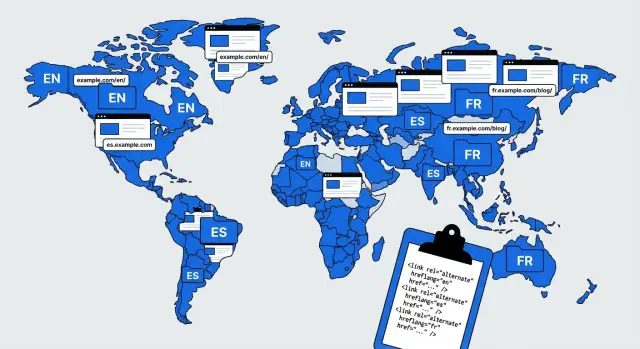
Hreflang is a hint that tells search engines, “These pages are the same idea, just for different languages (or countries).” When it’s set up well, it reduces the chance your French page shows for English searches, or that one English variant outranks another in the wrong place.
Use the right language and region codes
Hreflang values follow a simple pattern: language first, then an optional region.
Use a region only when the page is truly targeted (currency, spelling, shipping, legal requirements). If you have one English page for everyone, language-only targeting is often cleaner than trying to cover every country.
Self-referencing and consistent alternates
Two rules prevent most wrong-language problems.
First, each page should include a self-referencing hreflang entry. In other words, the English page should declare itself as English, not only list the other languages. This helps search engines confirm the set.
Second, alternates must be consistent across the whole group. If page A lists pages B and C as alternates, then pages B and C should point back to A and to each other. If one page is missing, search engines may ignore parts of your hreflang, and pages can end up competing.
When x-default helps
Use x-default only for a true catch-all page, like a language selector or a global homepage that lets users choose. Don’t use it as a patch for missing language pages.
Where to place hreflang (pick one)
You can publish hreflang in page HTML, in your XML sitemap, or in HTTP headers (mostly for non-HTML files). Most sites choose one method and stick with it. Mixing methods often creates mismatches, and mismatches are where wrong-language rankings start.
Step-by-step: implement hreflang without guesswork
Hreflang gets easier when you treat it like a mapping problem: every indexable page should declare its equivalents in other languages (and sometimes countries). The goal is to stop wrong-language rankings and reduce guessing.
1) Build the “one truth” URL map
Start with a spreadsheet that lists every indexable page concept (like “pricing”) and its locale versions. Include only pages you actually want indexed. If a language version doesn’t exist, leave it blank rather than pointing to a near-duplicate.
Track the basics: page name and type, the URL for each locale, indexability status, last updated date, the canonical you intend, and notes about differences (like incomplete translation or locale-specific legal text).
2) Choose canonicals first, then add hreflang
For each locale page, the safest default is a self-referencing canonical (the canonical points to that same page). Cross-language canonicals are a common cause of multilingual duplicate-content problems because they effectively tell search engines, “this translated version isn’t the main one.”
After canonicals are set, add hreflang annotations so each page points to every alternate version and includes itself.
3) Validate reciprocity and index signals
Hreflang must be reciprocal: if English points to Spanish, Spanish should point back to English, and both pages must be indexable.
Before you ship, spot-check a sample:
- Codes are valid and match the real language of the target page.
- Every referenced URL returns a normal successful response and isn’t blocked.
- Pages aren’t marked noindex, and canonicals don’t contradict hreflang.
- Redirects don’t change locale.
- URL formatting is consistent (trailing slashes, protocol, parameters).
If you generate content through an API, generate hreflang from the same URL map you use for routing. That keeps it consistent as new pages go live.
Canonicals, parameters, and other duplication traps
Duplicate-content issues in multilingual sites often come from small technical choices, not bad translations. Fix the basics and you reduce index bloat while making it easier for search engines to show the right language.
Canonical vs hreflang: what each one is for
Use hreflang to explain language and country targeting. Use canonical tags to choose the main URL when multiple URLs show the same content.
The key rule: translated pages usually aren’t duplicates. They’re alternatives. So they typically need hreflang, not cross-language canonicalization.
A safe default:
- Each language page has a self-referencing canonical.
- Language alternatives are connected with hreflang (and x-default only when a true fallback exists).
Parameters that quietly create thousands of “new” pages
Tracking and UI parameters are a classic source of accidental duplicates. A crawler can treat parameter variations like separate pages if you let it.
Keep control by making canonicals point to the clean URL, avoiding internal links that include tracking parameters, redirecting obvious tracking-only versions where appropriate, and using noindex for pages that must exist but shouldn’t appear in search.
Pagination, filters, and sorting: decide what deserves to rank
Filters and sorting can explode into near-infinite URL variations, and the problem multiplies across languages.
If a filtered view isn’t valuable in search, keep it out of the index and canonicalize it back to the main category. If a specific filtered page is valuable, treat it like a real landing page: stable URL, indexable, unique copy, and correct hreflang.
If you ship multilingual pages through templates (including API-driven setups like GENERATED), build these rules once at the template level. Otherwise you’ll repeat the same indexing mistake in every locale.
Common mistakes that cause index bloat
Index bloat happens when search engines find too many pages that look the same, or pages that should never have been public. The result is wasted crawl effort, messy signals, and sometimes the wrong-language page showing in search.
A frequent culprit is a language selector page that gets indexed by accident. If it’s linked sitewide (for example, from the header) and has thin content, it can still look important to crawlers.
Another big issue is auto-translation that changes only a few words while the template, headings, and most body copy stay the same. You end up with near-duplicates across languages, which can dilute relevance and trigger duplicate filtering.
Hreflang mistakes amplify the mess. Missing return tags break the set, inconsistent language and region codes confuse targeting, and blocking translated pages while still referencing them in hreflang creates contradictions that show up as unstable indexing.
If you want a fast audit, check these first: whether language switcher pages are indexable, whether translations are thin or partial, whether hreflang is reciprocal across all languages, whether codes are consistent everywhere, and whether robots rules or noindex conflict with hreflang references.
Translation QA steps that catch SEO issues early
A clean translation can still cause ranking problems if key SEO elements stay in the default language, or if internal links jump users back to the wrong locale. That’s where multilingual duplicate-content issues often start: search engines see near-identical pages with mixed signals.
Start with one rule: everyone translates from the same source version. If the source changed recently but one locale team works from an older export, you get mismatched sections, outdated claims, and inconsistent internal links.
A practical QA pass (15 to 30 minutes per locale)
Before publishing and again after pages go live:
- Confirm titles, meta descriptions, and main headings are translated and match the page intent.
- Click a handful of internal links in the menu, footer, and body. They should stay in the same locale.
- Check images for language mismatches in alt text, captions, and any visible text in the image.
- Spot-check local formats that affect trust: currency, units, dates, and addresses.
- Compare key sections against the source: product names, disclaimers, and calls to action should stay consistent.
A quick “snippet scan” helps too: look at what would appear in search (title, description, first heading). If those are clean, you avoid many early surprises.
Small example: the hidden link problem
A SaaS site launches Spanish pages and translates the body well, but the pricing link in the Spanish header goes to the English pricing page. Now Spanish pages send internal authority to English URLs, and users bounce. Fixing just header and footer links often improves both rankings and conversions.
If you generate translated drafts automatically, add a final human spot-check before you allow indexing. It’s the fastest way to catch issues tools miss.
A realistic example: fixing a 3-language product site
Imagine a small SaaS team with one key product page for “Team Calendar,” offered in English, Spanish, and French. Their goal is simple: each language page should rank in its own language, without being treated as a duplicate.
They start with one-page mapping and make the signals consistent across all three versions:
- Each page uses a self-referencing canonical.
- Each page lists hreflang alternates for the other languages and itself.
- A fallback is used only if there’s a real neutral page for it.
- Internal links keep users in the same language.
Before the fix, they relied on language switching via a query parameter. Multiple variations were indexed because people shared different versions and tracking parameters accumulated. Worse, the Spanish and French pages pointed their canonicals to the English page, so Google treated English as the main version and the other languages struggled to rank.
After moving to a clean, consistent language structure, they redirected the old parameter-based URLs to the right language pages, removed unnecessary indexable variations, and made canonicals and hreflang agree. Within a few weeks, crawl noise dropped and rankings stabilized.
To keep it from breaking again, they used a simple workflow: translation checks meaning and local terms, an SEO owner checks titles and internal links, a developer checks templates for canonical and hreflang output, and a QA editor verifies the page in a browser.
Quick checklist and next steps for scaling safely
Before you add a new language, spot-check a small set of pages (home, a category page, a top blog post, a product page, and a support page). These problems usually start small and multiply through templates.
Check that each locale page is indexable and returns a normal response, content is clearly written for that audience (not just swapped navigation), canonicals point to the same locale page, hreflang is present and reciprocal with correct codes, and the language switcher lands users on the matching page (not the locale homepage).
After that, pick one metric to watch for two weeks: indexed pages per locale. If the count rises faster than your real content output, you’re likely creating duplicates through parameters, filtered pages, internal search URLs, or leftover test pages.
When you scale beyond a couple of languages, consistency matters more than cleverness. Freeze one URL pattern, add a release gate for each locale (templates, canonicals, hreflang, sitemap, language switcher behavior), keep a small QA sample set you re-check after site changes, and keep incomplete translations out of the index until they’re genuinely useful.
If you’re using GENERATED, it can help to standardize prompts and glossary terms across locales, then run the same QA sample set before you allow indexing. Since GENERATED also supports CTA generation and performance tracking, it can be useful for spotting when a translation is accurate but doesn’t persuade in that market.
Frequently asked questions
Is multilingual “duplicate content” actually the same text copied everywhere?
It’s usually near-duplicate content, not a word-for-word copy. Pages share the same template, headings, and specs, and only small parts change, or the original language accidentally publishes across multiple locales due to incomplete translation.
Why does Google sometimes show the wrong language version of my page?
Search engines guess when language signals are weak or inconsistent. If pages look too similar, hreflang is missing or broken, or internal links point across locales, Google can pick the wrong version to show, even when the correct-language page exists.
What is “index bloat” on a multilingual site, and why does it matter?
Index bloat is when lots of low-value URLs get crawled and indexed, which dilutes signals and wastes crawl effort. It often comes from parameters, filters, thin auto-generated pages, and test or staging translations that accidentally stay public.
Should I use one page with a language switcher or separate pages per language?
Default to one crawlable URL per language when the content and on-page signals change with language. A single page that swaps languages after load can confuse both users and search engines, and it’s harder to measure and QA.
Which URL structure is safest for multilingual SEO?
Language folders are usually the simplest to keep clean because everything stays on one domain with consistent linking and tracking. Subdomains can work but often drift operationally, and country domains make sense only when the business truly differs by country (pricing, legal, support).
When should I target language-only vs language plus country?
Use language-only when the experience is basically the same for all speakers of that language. Add a country/region only when something meaningfully changes, like currency, spelling, shipping rules, compliance text, or product availability.
Should translated pages canonicalize to the original language page?
Set canonicals first, and in most cases each translated page should be self-canonical. Cross-language canonicals commonly suppress non-default languages because they tell search engines the translation isn’t the main version, which fights your localization goals.
What are the most common hreflang mistakes that break targeting?
You need valid language (and optional region) codes, a self-referencing hreflang on every page, and fully reciprocal alternates across the whole set. If one version is missing return tags, blocked, noindexed, or points to mismatched URLs, search engines may ignore the hreflang group.
How do tracking parameters and filters create duplicate pages across languages?
Treat parameters as potential duplicate URLs and make the clean version the default. Keep internal links clean, make canonicals point to the parameter-free URL, and prevent low-value variations (like tracking-only or endless sort/filter states) from becoming indexable.
What’s the quickest translation QA that prevents SEO problems before indexing?
Start by verifying the SEO basics are localized: titles, meta descriptions, and main headings should match intent in that language. Then check that header/footer/body links keep users in the same locale, and keep partial or low-quality translations out of the index until they’re genuinely useful; API-driven workflows like GENERATED can help enforce consistency if your URL map and templates are the single source of truth.