What keyword cannibalization looks like in real life
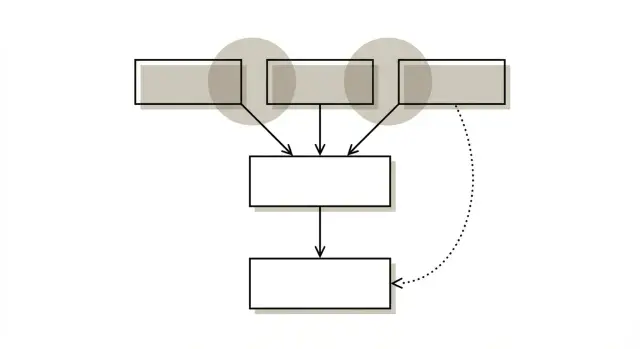
Keyword cannibalization happens when two or more pages on the same site try to rank for the same search query (or a very close variant). Instead of reinforcing each other, they compete. Google gets mixed signals about which page is the best answer.
The result is usually messy, not catastrophic: rankings bounce, clicks feel unstable, and the page that shows up is often not the one you want. One week your in depth guide ranks. The next week a thinner post replaces it, then it flips back again. Neither page reaches its potential because relevance, internal links, and external links are split.
Common patterns look like this:
- Two blog posts target the same term with slightly different titles.
- A category page and a blog post both aim at the same product or service keyword.
- A new “updated” article goes live, but the older version stays indexable.
- Several near duplicate location or comparison pages change only a few lines.
Overlap is not always a problem. It’s normal to cover one topic from different angles when the search intent is different (for example, “pricing” vs “how it works”). The red flag is when two pages claim the same job: answering the same question for the same person at the same stage.
A simple gut check: if you had to keep only one page for that query and the other wouldn’t be missed, you likely have cannibalization.
Common causes of overlapping pages
Overlapping pages usually come from speed and habits, not one “bad” page. Teams publish fast, nobody checks what already exists, and a topic quietly turns into two (or ten) competing URLs.
A frequent trigger is new content based on fresh ideas, trends, or briefs, without a quick search of your own site first. You end up writing “How to choose X” three times. Google has to guess which one is the main resource.
Site structure pages can also become accidental competitors. Category pages, tag pages, and filtered URLs sometimes start ranking for the same terms as your articles or product pages, especially when their titles and headings are generic. Filters are a common culprit because they can create many similar URLs that the CMS leaves open to indexing.
Location and “variation” pages collide when they’re mostly the same page with a city, year, or adjective swapped in. If “Service in Austin” and “Service in Dallas” share 90% of the copy, neither has a clear reason to exist as a separate search result.
Redesigns and migrations create overlap too. Old pages stay live “just in case” while new pages replace them. Both get internal links, both get crawled, and authority gets split.
Template driven content is another repeat offender. When dozens of pages share the same structure, headings, and intro text, they look interchangeable.
Quick checks that often reveal the cause:
- Multiple pages with near identical titles and H1s
- Tag or category pages appearing for the same queries as articles
- Old URLs still live after a redesign
- Many pages that differ only by city, year, or a small modifier
- Pages built from the same template with minimal unique content
The intent problem: when pages have no clear job
Most keyword cannibalization is really an intent problem. Two or more pages answer the same query, but none of them has a clear role. Search engines rotate which page to show, rankings wobble, and clicks get split.
A common mistake is treating one keyword as if it has one meaning. People might be trying to learn, compare options, or buy right now. If your site has multiple pages that all “sort of” cover all of those, they overlap.
These intents get mixed up most often:
- Learn: definitions, how to, basics, troubleshooting
- Compare: alternatives, pros and cons, pricing tiers, “best” lists
- Buy or sign up: product page, demo request, checkout, free trial
- Trust check: reviews, case studies, policies
You’ll also see intent confusion when pages are planned around internal formats (Sales page, Content page, Partner page) instead of what the visitor is trying to do. That tends to create multiple pages targeting the same query from different angles.
Example: a company publishes “Best project management software,” “Project management software pricing,” and “Project management software for small teams.” If each page includes a buyer pitch, a comparison table, and a beginner definition, they blur together. The fix starts by deciding which page owns “compare,” which owns “buy,” and which owns “learn,” then rewriting so each page does one job well.
If you generate content at scale, build intent labeling into your briefs so new pages don’t duplicate old ones. Tools like GENERATED (generated.app) make publishing faster, but the speed only helps if your topics and intent boundaries are clear upfront.
Early warning signs you can catch quickly
Keyword cannibalization rarely shows up as one obvious alert. It usually looks like unstable performance: the topic gets impressions, but no single page becomes the clear winner.
One of the fastest checks is to look at one query in your performance data and see whether different URLs take turns showing up. If page A is position 6 on Monday and page B is position 7 on Friday, Google is testing which one should represent the topic.
Early signals to watch:
- Position swapping: two or more URLs rotate for the same query over days or weeks.
- Impressions without clicks: several pages show impressions for the same terms, but CTR stays weak because none matches intent cleanly.
- Split authority: backlinks and mentions point to multiple similar pages instead of one strong resource.
- Confused internal linking: different pages get the same anchor text, so search engines can’t tell which URL is the “main” one.
Step by step: a simple overlap audit you can do in an hour
Keep the scope small so you finish. Pick 5 to 10 queries tied to outcomes: topics that drive meaningful traffic, leads, or sales.
The 60 minute overlap audit
- List your target queries in a simple sheet (one per row). Add one or two close variants if you can.
- For each query, list every page on your site that shows up for it. Use Search Console, a rank tracker, and a quick site search.
- Label each page’s intent in plain words: “how to guide,” “comparison,” “product/service,” “glossary/definition,” or “news/update.”
- Pick one primary page for that intent.
- For every non primary page, write one line on why it exists (older version, thin variant, different audience, seasonal update).
Once you label intent, patterns show up quickly. You might find three “beginner guide” posts and a glossary entry all trying to win the same query.
Decide what to do with each non primary page
Give every extra page one clear outcome:
- Keep it, if it serves a different intent and clearly supports the primary page.
- Merge it, if the content is useful but duplicated.
- Redirect it (301), if it has no unique value or is an outdated duplicate.
- Rewrite it, if the topic is valid but the page needs a different job.
How to map intent so pages stop competing
Intent mapping works best when it’s simple. For each page, write one purpose statement: who it’s for and what question it answers. If that sentence sounds vague, the page isn’t scoped yet.
A practical template:
- Page job: audience + question answered (one sentence)
- Primary query: the main phrase you want the page to win
- Close variations: 2 to 4 near synonyms that fit the same intent
- Boundary: what this page will not cover
Only split into separate pages when intent is truly different and you can keep the content distinct. A good test: would a reader be satisfied landing on either page for the same search? If yes, you probably need one page, not two.
To prevent new collisions, set a few publishing rules:
- One page per intent, not one page per phrasing
- No new page until you can name the existing page it will not compete with
- Each draft picks a primary query and a small set of variations, then sticks to them
- When intent matches, update an existing page instead of publishing a rival
Fix option 1: consolidate content into one stronger page
Consolidation is often the cleanest fix because it stops search engines from choosing between near duplicates. You end up with one page that fully answers the query with a clear purpose.
Start by choosing the page to keep based on intent fit and existing signals, not simply the newest URL. Look at:
- Best match to the search intent
- Strongest content foundation (structure, depth, freshness)
- Best performance signals (rankings, clicks, backlinks if available)
- A URL you can keep long term
Then merge thoughtfully. Pull over only what’s unique: a clearer explanation, a better example, a missing definition, a useful FAQ. If two pages say the same thing, keep the clearest version.
Before publishing the merged version, decide what happens to the old URLs. If intent is the same, redirect them to the primary page. If intent is genuinely different, keep them separate and rewrite to make the difference obvious.
Fix option 2: redirects that clean up the signals
A 301 redirect is the fastest way to stop two pages from fighting for the same query. It tells search engines the page moved permanently and consolidates most signals onto the destination URL.
Use a 301 when the old page no longer has a unique job: a thin article that overlaps a stronger guide, an older version of the same topic, or a tag like page that gets impressions but never satisfies intent.
Avoid redirecting everything to the homepage. That often behaves like a soft 404 and wastes relevance. Redirect to the closest match for the same intent.
Before you ship redirects, do a quick sanity check:
- Each old URL redirects directly to the final URL (no chains)
- No loops
- One canonical destination per intent
- Internal links updated to point to the final URL
Expect a transition period. The old URL can linger in results while search engines reprocess the change. If it sticks around for weeks, look for mixed signals such as internal links still pointing to the old page or conflicting canonical tags.
Support fixes: internal linking, canonicals, and indexing choices
Sometimes you can’t merge or redirect right away. Support fixes won’t solve cannibalization alone, but they reduce confusion for both search engines and readers.
Start with internal links. Pick one primary page for the topic and treat it like the hub. Make related pages point to it consistently. If half your content links to page A and the other half links to page B with similar anchor text, you’re still splitting signals.
Navigation matters too. Breadcrumbs, category pages, and “related articles” blocks should reinforce the same primary page.
Canonical tags help when two pages must exist and are nearly identical, such as a printable version or a tracking variant. They’re not a fix for different intent. If the intent differs, consolidate or rewrite instead.
For thin utility pages that shouldn’t rank (some tag pages, internal search results, placeholders), consider noindex. Use it carefully, since it removes the page from search.
Common mistakes that keep cannibalization coming back
Fixes fail when they reduce the number of URLs but don’t make each page’s purpose clearer. Cannibalization returns when pages still overlap in what they promise and who they’re for.
Two common errors:
- Merging pages with different intent, then creating one long page that tries to educate, compare, and sell all at once.
- Redirecting just to clean up the URL list, sending visitors to a loosely related page instead of the closest intent match.
Other patterns that recreate overlap:
- Keeping near duplicates and only swapping titles or a few paragraphs
- Consolidating without rewriting the intro and structure around one clear intent
- Forgetting to update internal links and navigation after redirects
- Judging results too early, then undoing changes before reindexing settles
After any consolidation or redirect, do a final pass: confirm one page owns the topic, internal links point to it, and every other page is clearly about something else.
Quick checklist before you publish or update pages
Most cannibalization starts as a well meaning update: a new post, a refreshed landing page, or a second “better” version that never replaces the first.
Before you publish, do two things:
- Choose the exact query (or tight topic) the page should win.
- Decide which single URL is the home for that intent.
A short pre publish checklist:
- One primary URL per intent (guide, product page, glossary definition, comparison).
- Scan for near identical titles and introductions across existing pages.
- Check internal links and navigation labels: do they point to the owner page or split attention?
- If replacing an old page, confirm a single hop 301 to the closest match.
- After launch, watch the query for 1 to 2 weeks for fewer ranking flips.
Example: you already have “Email marketing checklist” ranking on page two. You draft “Email marketing checklist for 2026” with the same structure and angle. Instead of publishing a rival, update the existing page and add a short “2026 updates” section, keeping the old URL.
Example scenario and practical next steps
A common setup is a guide, a glossary definition, and a product page all trying to rank for the same phrase. Google swaps which one shows up, and none holds position for long.
A clean way to separate roles:
- Product page: “buy/choose/compare” intent
- Blog guide: “how to” intent
- Glossary: “what does it mean” intent
If two pages serve the same intent, pick the stronger one and fold the best parts of the weaker into it.
Practical next steps:
- Make a simple map: query -> primary URL -> intent.
- Merge duplicate sections into the winner, then 301 redirect the weaker page.
- Rewrite the first 100 words on each remaining page so intent is obvious.
- Update internal links so supporting pages point to the right owner page.
Over the next few weeks, you should see fewer ranking flips, more stable impressions, and clicks concentrating on one URL per query.
To keep it from coming back, add an intent check to your publishing workflow. Before a draft goes live, confirm which page is supposed to rank and what question it answers. If you publish through an API or generate pages at scale, it helps to standardize this step in the brief so speed doesn’t turn into accidental overlap.
Frequently asked questions
What is keyword cannibalization in plain English?
Keyword cannibalization is when multiple pages on your site try to rank for the same query (or a very close variant). Search engines then have to choose between them, so rankings can flip between URLs and neither page becomes the clear “best” result.
How can I tell if two pages are cannibalizing each other?
The most common sign is URL swapping: you see different pages from your site taking turns ranking for the same query over days or weeks. You may also notice impressions spread across several pages while clicks and CTR stay low because no single page matches intent cleanly.
Is it always bad to have multiple pages targeting the same keyword?
Not always. It’s normal to have multiple pages about one topic if they serve different intent, like a definition page versus a “how to” guide versus a product page. It becomes a problem when two pages are trying to do the same job for the same searcher.
What causes keyword cannibalization most often?
It usually happens when teams publish quickly without checking what already exists, or when an “updated” version goes live and the old one stays indexable. Category, tag, and filter URLs can also accidentally compete if their titles and headings are generic and they’re allowed to rank.
What’s the fastest way to audit cannibalization without doing a huge project?
Pick a small set of high-value queries, then list every URL that shows up for each query in your performance data. Assign each URL a simple intent label, choose one primary page per intent, and note why the other pages exist so you can decide whether to keep, merge, rewrite, or redirect them.
When should I merge two competing pages into one?
Consolidate when you have two pages serving the same intent and both contain useful material, but split the signals. Choose the best long-term URL, merge only the unique parts into it, and make the combined page clearly focused on one job so it becomes the obvious “owner” for that query.
When is a 301 redirect the best fix for cannibalization?
Use a 301 redirect when a page no longer has a unique purpose, like an older version of the same article or a thin variant that overlaps a stronger guide. Redirect to the closest intent match, keep it one hop (no chains), and update internal links so you’re not still sending mixed signals.
Can internal links or canonical tags fix cannibalization on their own?
Start by picking one primary page and linking to it consistently from related pages using clear, matching anchor text. Canonical tags can help for near-duplicate versions that must exist, but they won’t fix two pages with different intent; in that case you need a rewrite, merge, or redirect.
How do I fix cannibalization that’s really an intent problem?
Yes, especially if your “guide,” “pricing,” and “best tools” pages all try to educate, compare, and sell at the same time. Make each page’s purpose obvious in the first section, remove overlapping sections that belong elsewhere, and set a clear boundary for what the page will not cover.
How can I prevent keyword cannibalization from coming back after I fix it?
Before publishing, choose the exact intent and the single URL that should own it, then check your site for near-duplicate titles and intros. If you generate content at scale (including via tools like GENERATED), build an intent and “existing owner page” check into your brief so speed doesn’t create accidental overlap.