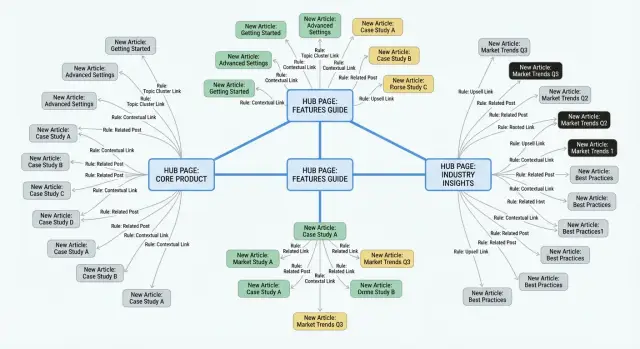
Why internal links break down as you publish more content
Internal links usually start out fine. When you have 10 posts, you remember what you've written and you can add a few relevant links as you go. After 50 or 200 posts, that memory fades. New articles ship on a deadline, and internal linking becomes the step that gets skipped.
Decision fatigue makes it worse. Every new post raises the same question: "Where should this point?" If the answer isn't obvious, people either leave links out or grab whatever is easiest to find in the CMS. Over time, you end up with posts linking to last week's article instead of the page that actually explains the topic.
When people talk about "hubs," they usually mean a central page that collects and organizes a topic. It might be a pillar page, a category page, a long guide, or a "start here" page that introduces the key subtopics and points to the best articles.
Manual linking breaks down because it's hard to do consistently. Writers choose different links for the same idea, anchor text gets repetitive, and older hubs stop receiving fresh links. The cost isn't just time. It's lost opportunities to guide readers to your best pages, and weaker signals to search engines about what your site considers important.
The goal is straightforward: every new post should reliably connect to the right hub (and sometimes a small set of related spokes) without someone needing to remember the whole site and edit each post by hand. Automation can help, but the real win comes from writing the rules down first.
What a hub-and-spoke internal linking system looks like
A hub-and-spoke system keeps your site organized as you publish more pages. A hub is the home base for a topic. It covers the big picture, answers the main questions, and points readers to the best supporting pages.
A good hub page:
- makes a clear promise (what the topic is)
- covers the main subtopics
- uses a stable URL you won't want to change every month
- works even if someone lands on it first
Spokes are the pages that support the hub. They can be blog posts, updated guides, news items, glossary entries, or short how-tos. A spoke goes deep on one slice of the topic, and it should send readers back to the hub when they want the full overview.
The linking pattern is simple:
- Spoke to hub: every spoke links up to its best-matching hub.
- Hub to key spokes: the hub links down to the spokes that answer common questions.
- Spoke to spoke: optional, and only when the connection is genuinely helpful.
This direction matters. When every page "knows" where home is, internal links stop feeling random.
With a dozen pages, you can keep links tidy by hand. With hundreds or thousands, manual linking breaks. People forget hubs, create near-duplicates, or link to whatever they remember. A hub-and-spoke setup gives you a default decision: every page must belong somewhere.
Example: you publish a new glossary entry explaining "canonical tags." That's a spoke. It links to your hub page about technical SEO basics. The hub links back down to key spokes like "site indexing," "sitemaps," and "redirects." If you generate content programmatically, you can apply the same routing logic to every new item so the structure stays consistent as volume grows.
Set the rules before you automate anything
Automation only works when it has clear boundaries. If you skip the rules, you don't get consistent internal linking. You get random links that confuse readers and weaken your structure.
Start by defining the building blocks:
- your small set of hub pages
- your content types (news, how-to, glossary, landing pages)
- your topic or tag set
- a couple of reusable link blocks (for example: "Related hub" and "Next steps")
Keep these stable so your rules don't change every week.
Next, define what counts as a hub. A hub isn't just a popular post. It should be evergreen, broad enough to collect many related articles, and strong enough that a reader can start there and keep learning.
A simple qualification test:
- evergreen topic with steady search intent
- broad coverage (not one narrow question)
- sections that naturally reference subtopics
- updated occasionally
- intended to be the best page for that theme
Then set limits so pages stay readable. Decide a maximum number of internal links per post (for many blogs, 5 to 10 is plenty) and a cap for hub links (often 1 to 2). Also define what should never happen, like linking to two competing hubs in the introduction.
Finally, pick consistent placement. Patterns help readers and make editing easier. For example:
- one hub link near the top for context
- one or two related links in the middle when they support a point
- a short "Next" block at the end
If you publish a new how-to post, one rule might be: add one hub link in the first 150 words, then add up to two supporting links after the first main section.
How to decide which hub a new post should link to
Every new post should "know" which hub page (or cluster page) it belongs to and link there without you rethinking the decision each time.
Treat hub routing like a small set of rules, not a one-off editorial choice. Each rule should be easy to explain, easy to test, and safe when it's wrong.
Three signals that usually work best
Most sites get clean results by combining taxonomy (topics), on-page signals (keywords and entities), and content type.
A practical rule set:
- Topic or tag mapping: map each topic/tag to one primary hub, with an optional secondary hub when overlap is normal.
- Keyword/entity triggers: if a post contains specific terms (for example "how to," "pricing," product names, or key concepts), award points to matching hubs.
- Content type routing: treat "news," "glossary," "case study," and "how-to" as separate lanes with different defaults.
You also need a priority order for conflicts (for example: content type first, then tags, then keyword score), plus caps so you don't overload the page.
After scoring, choose the top hub if it clears a threshold. If it doesn't, use a fallback.
Fallback rules for ambiguous posts
Some posts sit between topics, especially broad opinion pieces or multi-topic guides. Don't force a bad match. Route them to a general hub (like "Getting started" or "All resources"), or to the hub that best matches the post's main purpose.
Example: you publish "How to write better meta descriptions." The tags include "On-page SEO," and the text repeatedly mentions "click-through rate" and "search snippets." Your rules might select the "On-page SEO" hub from tags and confirm it with keyword triggers. If the post is a glossary entry ("Meta description: definition"), your content type rule should override and route it to a "Definitions" hub instead.
If you're generating content through a system like GENERATED, you can apply this routing logic at creation time so new posts ship with the hub link already included.
Anchor text rules that stay natural and consistent
Anchor text is where a rules-based system can either feel human or feel copied. The goal is simple: links should be clear for readers and varied enough that they don't repeat the same phrase across dozens of pages.
Give each hub a small "anchor palette" the system is allowed to use. Aim for 3 to 5 short patterns that all mean the same thing, written the way a person would naturally refer to that hub.
For one hub, an anchor palette might include:
- "internal linking guide"
- "internal linking checklist"
- "how internal links work"
- "topic cluster basics"
- "linking your content hubs"
This keeps things consistent without making every page look identical. A good rule is to avoid using any single anchor more than once per page, and to rotate phrasing across posts.
Keep anchors descriptive and short. Most of the time, 2 to 6 words is enough. Skip forced wording that doesn't fit the sentence. If you wouldn't say it out loud, don't use it as anchor text.
Exact-match repetition: set a limit
Exact-match anchors aren't inherently "bad." Repetition is. Limit exact-match versions to cases where the sentence naturally calls for it, and keep it to a small share of links overall.
Brand terms vs topic terms
Use brand anchors when the destination page is actually about the product (pricing, features, templates, or a specific workflow). Use topic anchors for educational hubs and evergreen guides.
If a post mentions a specific action in GENERATED, a brand anchor like "GENERATED content API" can make sense. Otherwise, stick to the topic phrase so links don't look like keyword stuffing.
If you're generating anchors automatically, store the chosen anchor with the link. That way future updates don't reshuffle anchors and create odd patterns over time.
Step-by-step: build a rules-based system in one afternoon
You can set up a scalable internal linking system without building a complex tool. Write down rules that stay true as you publish, then make them easy to follow or automate.
A practical 5-step build
-
List your hubs and name each topic in plain words. Keep labels specific enough that a new article can match them quickly (for example, "email deliverability" instead of "email"). If a hub can't be described in one sentence, it's often two hubs.
-
Create a simple routing table. Map signals to hubs: keywords, categories, tags, or a short set of yes/no questions ("Is this about X?"). Start small and expand when you see gaps.
-
Decide where links are allowed to appear. Pick 2 to 3 placements that look natural: one in the first third of the post, one in the middle, and optionally one near the end if it truly helps. Avoid placing links in headings or the first sentence.
-
Set caps so the page doesn't look spammy. Define a maximum number of internal links per post, one link per hub, and a minimum spacing so inserted links don't cluster.
-
Add a quick QA gate before publish. Treat it like spellcheck: fast, consistent, and non-negotiable.
A lightweight QA gate (5 checks)
- Does the post link to exactly 1 primary hub that matches the main topic?
- Do the sentences still read naturally if you remove the link?
- Are you within your caps (total links, one per hub, spacing)?
- Are anchors specific (not "click here") and not repeated word-for-word across posts?
- If routing is uncertain, does the system flag it for manual choice instead of guessing?
If you use a content generation pipeline, store the routing table and rules next to your templates so each new article follows the same logic.
How to monitor and tune the system over time
A rules-based setup isn't "set and forget." Topics change, new hubs appear, and some hubs quietly stop receiving links. A simple review rhythm keeps the system aligned with what you're actually publishing.
What to track (and why)
Use one spreadsheet or dashboard you update weekly or monthly. You're looking for drift: rules that made sense a few months ago but no longer match reality.
Track:
- hub link counts from new posts (per week/month)
- "zero-link" hubs (often a mapping gap or an obsolete hub)
- over-linked hubs (a sign your hubs are too broad or your rules are biased)
- clicks and engagement on hub pages (links that get ignored often signal a mismatch)
- crawl and index signals after changes (renames, merges, and moves can break old mappings)
Example: you launch a new "Email Marketing" hub, but your routing still classifies most posts under "Marketing Basics." In your dashboard, the new hub stays at zero links for weeks. That's a rules problem, not a content problem.
Tune after structure changes
Any time you rename a hub, merge two hubs, or split a hub into subtopics, treat it like a small release:
- update the hub dictionary (names, synonyms, must-match terms)
- update destination mappings so old hub IDs don't linger
- re-run routing on the last 20 to 50 posts and compare outcomes
- spot-check anchors to make sure the new wording still reads naturally
If you're using a platform like GENERATED, performance tracking can help you see which hub links actually get clicked so you can tune based on behavior, not guesses.
Common mistakes and traps to avoid
Rules help, but a few predictable mistakes can quietly undo the benefits.
Too many links per post
More links don't always add value. If every other sentence is a link, readers stop clicking and the page becomes harder to scan.
A simple approach works well: include the hub link plus 1 to 2 genuinely helpful related pages. Let the hub page carry the bigger menu of options.
Wrong hub because topics are too broad
If your hubs are big buckets like "Marketing" or "SEO," the router will send almost everything to the same place. That creates a junk-drawer hub that never feels relevant.
Make hubs narrow enough that a reader instantly knows what they'll get. If a post fits two hubs, choose a primary one and add a secondary link only when it adds real context.
Common traps that lead to cleanup later:
- stuffing in links until the post reads like a directory
- letting one vague hub absorb unrelated topics
- repeating the same anchor text across many posts
- building hubs that mostly link to each other (so readers loop)
- keeping old mappings after you rename, merge, or split hubs
Anchor text that looks copied
If the system always uses one anchor like "read more here," it feels unnatural. Stick to a small set of approved patterns and sometimes use the destination page title when it fits.
Treat hub mappings as a living file. When hubs change, update the rules immediately and re-check recent posts. Otherwise automation keeps shipping links to pages that no longer match what the reader expects.
Quick checklist before you hit publish
Do these checks in two minutes before publishing and you'll avoid most internal linking mess later.
First, confirm routing:
- Does the post link to the right primary hub?
- If you include a secondary hub, does it genuinely match the post's intent?
- Can a reader reach a hub within a few clicks from this post (no dead ends)?
Then scan anchors:
- Do anchors read like part of the sentence (not like labels pasted in)?
- Are you avoiding duplicated anchors back-to-back?
- If two hub links are close, do they use different phrasing?
Finally, do a quick link health pass:
- Click each hub link once to confirm it loads and lands on the right page.
- If routing is uncertain, make sure the post is flagged for review instead of silently guessing.
If a link shows up, you should be able to answer "why is this here?" without guessing. A simple log (even a spreadsheet) is enough: post title, hub linked, and the rule that triggered it.
Example workflow: a new post that links itself to the right hub
You publish a new article: "How to write a product comparison that ranks." You want it to point readers (and search engines) to the best next page without having to think about it every time.
A rules-based flow can run as soon as the post is created:
- Extract signals from the draft: title, headings, categories, and a short summary.
- Map the post to a hub using a keyword-to-hub table (for example, "comparison," "alternatives," "vs" -> Hub: "Product comparisons").
- Add one hub link near the top (within the first 20% of the article) and optionally another near the end if it truly helps.
- Add one supporting link to a closely related spoke page chosen from the same cluster.
- Save what happened: which hub won, which anchors were used, and whether there were conflicts.
In this example, the post links to the "Product comparisons" hub. It also links once to a supporting page like "How to structure an alternatives table" because that's a practical next step.
Sometimes a post matches more than one hub. "How to write a product comparison that ranks" could also match a "SEO writing" hub. You need a tie-break rule so the system stays consistent:
- prefer the hub that matches the primary intent in the title
- if intent is unclear, prefer the strongest match in headings (headings beat body text)
- if still tied, prefer the smaller cluster (the one that needs more support), then log the tie for review
Next steps: write your rules down like a small linking handbook (hub definitions, keywords, anchor patterns, tie-breaks). If you already publish through an API-based workflow, a tool like GENERATED (generated.app) can help apply those rules consistently across new content and track which calls to action and link placements get real engagement.
Frequently asked questions
Why do internal links get worse as a blog grows?
Internal linking fails mostly because memory and time don’t scale. As the archive grows, writers can’t recall the best target page, and linking becomes an optional step that gets skipped or rushed.
Without a simple default (like “this belongs to that hub”), people link to whatever they recently published or whatever the CMS shows first, and the structure slowly turns random.
What’s the difference between a hub page and a spoke page?
A hub is the home page for a topic: it explains the big picture and points to the best supporting pages. It can be a pillar page, a category landing page, or a “start here” guide.
A spoke is a focused page that goes deep on one subtopic and links back to its hub so readers can return to the overview.
How many hub pages should I create at the start?
Start with a small number so routing stays consistent. If you can’t describe what the hub covers in one clear sentence, it’s usually too broad and should be split.
As a practical default, create hubs for topics you plan to publish on repeatedly and keep their URLs stable so you don’t keep re-mapping later.
How do I choose the right hub for a new article?
Pick one primary hub for every new post by using a simple priority order you can repeat. A common approach is to decide based on content type first (glossary vs how-to vs news), then tags or categories, then keyword or entity signals from the title and headings.
If the top match is weak, don’t force it; route the post to a general “getting started” or “resources” hub and flag it for review.
What if a post fits two hubs equally well?
Use a tie-break rule so the outcome is predictable. A good default is to choose the hub that matches the main intent of the title, then use headings as the next signal because they usually reflect what the page is really about.
If it’s still tied, pick one primary hub and only add a secondary hub link when it genuinely helps the reader understand context, not just because you can.
How do I keep anchor text from looking copied across posts?
Give each hub a small set of allowed anchor phrases and rotate them. Keep anchors short, descriptive, and natural in the sentence so they read like something a person would say.
A practical rule is to avoid using the same anchor twice on one page and to store the chosen anchor so future edits don’t reshuffle wording in weird ways.
How many internal links should a post have?
Keep it low enough that links stay meaningful. A simple default is one hub link plus one or two truly relevant supporting links, rather than turning the post into a directory.
If you need more options for the reader, put the bigger menu on the hub page and let the spoke point up to it.
Where should hub links appear inside a post?
Place the hub link early enough to give context, but not as the very first sentence. Many teams do well with a hub link in the first section, then one supporting link later where it directly supports the point being made.
Consistent placement makes the system easier to audit and reduces the temptation to sprinkle links randomly.
How do I monitor and tune a hub-and-spoke linking system over time?
Track whether hubs are receiving links from new posts and whether any hubs are getting ignored or overused. Also watch clicks and engagement on hub pages, because low interaction can mean your routing or anchor text isn’t matching reader intent.
Any time you rename, merge, or split hubs, re-run routing on recent posts and spot-check results so old mappings don’t keep shipping wrong links.
What are the biggest mistakes when automating internal linking?
Automating before you define rules usually creates consistent mistakes at high volume. Write down hub definitions, routing priorities, caps, and what should never happen, then automate only what you can test.
If you publish through an API-based workflow, a platform like GENERATED can apply your routing rules at creation time and help track which link placements get real engagement, but you still need clear inputs and a QA step to catch edge cases.