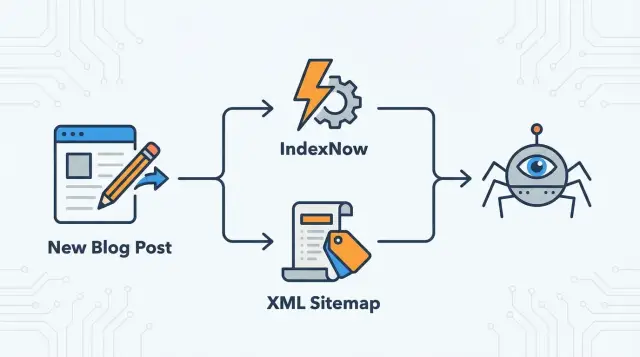
Why new pages are not found right away
Indexing means a search engine has discovered your page, visited it, and stored it so it can appear in results. Publishing only makes a page available on your site. It doesn’t automatically put it into a search engine’s database.
New pages often stay invisible for days because crawlers run on their own schedules. They have billions of URLs to get through, so they prioritize what looks important and revisit sites based on past signals like publishing frequency, overall site quality, server speed, and whether previous visits found worthwhile updates.
Discovery can also fail for simple reasons. The page might not be linked from anywhere yet, your sitemap might not be processed, or the crawler might hit a blocker. One small issue, like a noindex tag, a robots.txt rule, a redirect chain, or slow responses, can delay indexing even when the content is strong.
What you can control usually comes down to a few basics:
- Make the page easy to reach from other relevant pages on your site.
- Keep the URL stable after publishing.
- Avoid accidental blocks (robots.txt) and accidental
noindex. - Make sure the canonical URL points to the page itself.
What you can’t fully control is timing. Even with a clean setup, search engines may wait, especially with brand-new sites or pages that look very similar to what’s already indexed.
Speed matters most when timing matters: a sale landing page, a news post tied to an event, a critical pricing update, or a fix to a page that was broken. For evergreen content, a few days rarely changes the outcome.
Example: you publish a new how-to article on Tuesday. If it’s only reachable through a buried category page and your homepage doesn’t link to it, crawlers may not find it until their next routine visit. A clear internal link and a fast update signal can turn “maybe next week” into “much sooner.”
How XML sitemaps work
An XML sitemap is a file that lists the URLs you want search engines to discover. Think of it as a directory: it tells crawlers what exists and sometimes when it last changed.
A sitemap is a hint, not a command. It can help search engines find and revisit pages, but it doesn’t guarantee indexing. If a crawler thinks a page is low quality, duplicated, blocked, or not worth spending resources on right now, it can ignore it.
Most sitemaps include a URL plus a few optional fields:
- loc: the page URL (the only truly required field).
- lastmod: when the page meaningfully changed.
- priority and changefreq: often ignored, so don’t rely on them.
The practical takeaway: sitemaps are great for completeness. They help search engines understand the full set of important pages on your site, including older or deeper pages. They’re less effective when your main need is “I just published this, please check it now.”
In a healthy workflow, the sitemap updates automatically when you publish, unpublish, or change a page. If you publish through an API or a headless setup, make sure the sitemap is generated from the same source of truth as your live pages, so you don’t list URLs that 404 or miss brand-new ones.
How IndexNow works and what it tells search engines
IndexNow flips the model. Instead of waiting for a crawler to discover changes on its own, you notify supported search engines right when a page is added, updated, or removed.
You send a small notification that says, in effect: “This URL changed. Please recrawl it.” You’re not sending page content, and you’re not guaranteeing indexing. You’re speeding up the moment the search engine becomes aware something changed.
IndexNow works best when you fire it right after the updated page is live and returning a normal success response. If you notify too early (while the page is broken or not fully deployed), you can trigger a fast recrawl of a bad version.
IndexNow is a strong signal, but it doesn’t replace good site structure. Search engines still rely on internal links, consistent navigation, correct canonicals, and overall usefulness to decide whether to index and rank a page.
Think of IndexNow as a doorbell, not a map.
When to use each, and how they work together
An XML sitemap is your site’s inventory list. It’s the reliable place search engines can check to discover the pages you consider important, even if those pages are old, rarely linked, or buried deep in navigation.
IndexNow is a heads-up. It flags a specific URL that was added, updated, or removed so a crawler can come sooner instead of waiting for the next crawl cycle.
Used together, they cover both needs:
- Sitemaps help search engines find everything that matters.
- IndexNow helps them notice what changed today.
A simple rule of thumb:
- Keep a clean sitemap with only canonical, indexable URLs.
- Notify IndexNow when a page is newly published, meaningfully updated, or removed.
During bigger changes, they also complement each other. If you rename a slug, the sitemap helps search engines learn the new set of URLs across the whole site, while IndexNow can quickly flag the old URL as removed and the new one as added.
Before you start: quick requirements to check
None of this helps if your pages aren’t actually eligible to be crawled and indexed. Search engines can receive the signal and still skip the page if it returns the wrong status, is blocked, or points somewhere else.
Start with the basics. Every URL you want indexed should be publicly accessible, load quickly, and return a clean 200 status code. If it returns a redirect, 404, or server error, you’re sending crawlers into a dead end. Also confirm the page isn’t behind a login, a geo block, or aggressive bot protection.
Robots rules are a common silent blocker. A line in robots.txt can stop crawling, and a meta robots tag or HTTP header can stop indexing even if crawling is allowed. Check the rendered HTML for noindex, and confirm robots.txt isn’t disallowing the folder where new content lives.
Canonicals and redirects can also confuse crawlers. If a new post has a canonical pointing to a different URL (or to the homepage), search engines may treat it as a duplicate and skip indexing.
Internal links still matter, even if you use IndexNow. A notification doesn’t explain context or importance. Links from already-crawled pages help search engines understand what the new page is about and where it fits.
Simple rollout plan to speed up indexing after publishing
Treat XML sitemaps as your always-on baseline and IndexNow as the fast notification for real changes.
-
Clean up your sitemap. List only pages you actually want indexed: 200 status, self-canonical, and not blocked by robots.txt or
noindex. Keep low-value URLs out (internal search results, parameter pages, thin tag pages you don’t want in search). -
Make sitemap updates automatic. When you publish, edit, or remove a page, the sitemap should reflect it quickly. If you run a larger site, splitting into a few sitemaps (posts, news, glossary) can make updates easier to spot.
-
Add IndexNow, but keep it tight. Automate submissions from the same place you publish content (a publish webhook is a common trigger). Only notify on changes a searcher would care about.
-
Define simple triggers. Submit IndexNow for:
- New pages
- Meaningful updates (title, main body, structured data)
- Deletions
Skip typos and tiny formatting edits.
Then review weekly for a month. You’re mainly looking for fewer delays and fewer indexing surprises, not instant rankings.
Common mistakes that waste crawl and slow indexing
Most indexing delays are self-inflicted. Search engines can only spend so much crawl time on your site. If you send messy signals, they learn to trust you less.
The biggest time-waster is submitting URLs that can’t be indexed: pages blocked by robots.txt, pages with noindex, or pages that canonicalize somewhere else. The same applies to notifying IndexNow for URLs that immediately redirect.
Another common issue is over-notifying. IndexNow isn’t “faster if I spam it.” Re-sending the same URL repeatedly without meaningful change trains search engines to ignore the signal.
Sitemaps also get polluted with duplicate URLs, especially parameter variants (sorting, filtering, tracking). Crawlers waste time on duplicates instead of new or improved pages.
Finally, be careful with lastmod. If every URL always shows today’s date, crawlers stop trusting it. Update lastmod only when the main content changes.
Example scenario: a small blog that publishes weekly
Imagine a small blog that publishes five new posts every week and refreshes around 10 older posts each month.
A clean rhythm looks like this:
- On publish: notify IndexNow for the new post URL.
- On major edit: notify IndexNow for the updated post URL.
- On minor edit: do nothing.
- Ongoing: keep the XML sitemap accurate and up to date.
If you publish related pages that truly change (for example, a category page that now lists the new post), you can notify those too, but keep it limited.
Early “good” signs are practical:
- New URLs appear in indexing tools within a few days.
- Crawl activity becomes more consistent after publishing days.
- Updated posts get re-crawled sooner after major edits.
If nothing changes, look for stale sitemap output, robots or noindex blocks, weak internal linking, or too many low-value notifications.
Quick checklist: your indexing setup in 5 minutes
Right after publishing (or after a deploy), sanity-check the basics:
- Indexable and self-canonical: the canonical points to the same URL (not the homepage, not a category page).
- Not blocked: no
noindexin meta robots or HTTP headers, and robots.txt allows the path. - Clean response: returns 200 and is publicly accessible (no login wall, no error state).
- Sitemap reflects reality: the new URL appears quickly; redirects, 404s, and non-canonical URLs are not listed.
- IndexNow only for meaningful changes: new pages, real updates, and deletions.
Next steps: start small, measure, then automate
Start with one milestone: new pages only. New URLs are the clearest test because there’s no history to muddy the results. Once that’s stable, expand to major updates and deletions.
Keep a lightweight log (even a simple spreadsheet) with the URL, publish date, whether you used sitemap/IndexNow/both, and when it was discovered and indexed. Check weekly for trend changes.
If the plumbing is right and some pages still lag, the cause is usually the page itself or how it’s connected. Focus on one clear search intent per page, add at least one strong internal link from an already-crawled page, and avoid near-duplicates.
If you want to automate more of this, a platform like GENERATED (generated.app) can help tie together content publishing with indexing signals like IndexNow and sitemap generation. Automation saves time, but it still depends on the same fundamentals: accessible URLs, correct canonicals, and clean crawl signals.
Frequently asked questions
Why isn’t my new page showing up in Google right after I publish it?
Publishing only makes a URL available on your site. A search engine still has to discover it, crawl it, and decide it’s worth storing in its index, and that can take days depending on crawl schedules and signals from your site.
Does submitting an XML sitemap guarantee indexing?
No. A sitemap is a hint that a URL exists, not a promise that it will be indexed. If the page looks duplicated, low value, blocked, or points its canonical somewhere else, search engines can still skip it.
What URLs should I include in my XML sitemap?
Include the pages you actually want indexed and that return a clean success response. Keep out URLs that are blocked, marked noindex, redirecting, or non-canonical, because those waste crawl attention and can slow discovery of your real pages.
How should I use `lastmod` in my sitemap without hurting trust?
Use lastmod only when the main content meaningfully changes. If every URL always shows today’s date, crawlers tend to stop trusting the field, and you lose the benefit of signaling real updates.
What does IndexNow actually do?
IndexNow is a way to notify supported search engines that a specific URL was added, updated, or removed. It helps them recrawl sooner, but it still doesn’t force indexing or rankings.
When is the best time to send an IndexNow notification?
Send the IndexNow notification right after the page is live and returns the correct status code. If you notify too early during a deploy, you may trigger a quick recrawl of an error page or an incomplete version.
What changes are worth submitting to IndexNow?
Use it for new pages, meaningful updates to the main content, and deletions. Skip tiny edits like small typo fixes, because repeated “nothing changed” signals can get ignored over time.
What are the most common technical reasons a page won’t get indexed?
Start by checking for a noindex tag, a robots.txt rule blocking the path, or a canonical pointing to a different URL. Also confirm the page isn’t behind a login, geo restriction, or heavy bot protection that blocks crawlers.
Do internal links still matter if I use IndexNow?
Yes. IndexNow is a fast alert, but it doesn’t show context or importance. Internal links from already-crawled pages help crawlers find the URL naturally and understand where it fits in your site.
Will redirects or changing a slug after publishing slow down indexing?
It usually slows things down and can waste crawl time. Keep the URL stable, avoid redirect chains, and only notify IndexNow for the final canonical URL that returns a clean response.