What topic clusters solve (in plain language)
A topic cluster is a simple way to organize content so Google and real people can follow it.
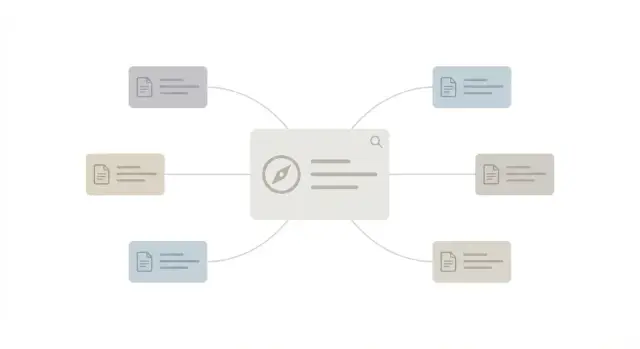
You publish one strong pillar page that explains the main topic. Then you publish several supporting articles that answer specific questions. You connect them with internal links so someone can move from the overview to the details (and back) without getting lost.
Random blog posts can work when your site is small. As you publish more, pages start competing with each other, repeating the same points, or leaving gaps. A visitor lands on one post, can’t find the next step, and leaves. Search engines also see a pile of related pages with no clear “main” answer.
When clusters perform well, it usually comes down to four things:
- Intent match: the page answers what the searcher meant.
- Coverage: the cluster answers the key sub-questions, not just one angle.
- Clarity: titles, headings, and examples make the answer easy to use.
- Confidence: internal links show how the pieces fit and which page is the hub.
Clusters work because they mirror how people learn. Someone starts broad (“what is X?”), then wants specifics: a comparison, a checklist, examples, or a fix for a common mistake. A cluster lets you guide that journey instead of hoping they search again and stumble into your next post.
Example: “email marketing for small shops.” Your pillar page explains the full process. Supporting articles cover welcome emails, subject lines, sending frequency, and common mistakes. Each supporting article links back to the pillar, and the pillar points readers to the right next article depending on what they need.
If you publish content through an API-based system like GENERATED, clusters are also easier to maintain. You can refresh the pillar without letting the rest of the set drift out of sync.
Define the topic and the search intent you want to win
Start with the problem your reader is trying to solve, not what you sell or the features you want to highlight. A good cluster topic sounds like something a customer would actually say:
“I need to choose payroll software that won’t be a pain to set up.”
“My tomato plants keep getting brown spots - what do I do?”
Then decide which search intent you’re trying to satisfy. Most queries fall into a few common buckets:
- Learn: understand the basics, definitions, how it works
- Compare: differences, pros and cons, alternatives
- Choose: pick the right option for a specific situation
- Do: complete a task step by step
- Troubleshoot: fix a problem, error, or confusing result
Watch for mixed intent. If one query can mean two different things, split it.
For example, “email warm up” could mean “what is it and why it matters” (learn) or “how to warm up a new domain safely” (do). Trying to do both on one page usually creates a scattered article that satisfies neither.
Before you write, define what “done” coverage looks like. A simple way:
- Write the one-sentence problem and who it’s for.
- List the 5-8 questions someone must get answered before they can act.
- Decide the one action you want them to take next.
- Set boundaries: what you will not cover in this cluster.
If you use a content tool like GENERATED, put this intent mapping directly into your brief so every supporting article stays on-mission.
Choose a pillar page that can carry the cluster
A pillar page earns the broad search and helps people (and search engines) discover more specific answers around it.
Pick a query that’s wide enough to have real sub-questions, but not so wide that your only option is vague advice.
A quick test: write the topic in your notes and list 8-15 questions someone would ask next. If you can do it easily, there’s probably enough depth for a cluster. If the questions feel random, the topic may be too broad.
The pillar should cover the basics without turning into a wall of text. If you keep adding “also” sections that don’t belong together, split the topic. A good pillar explains the big picture, defines key terms, and points to deeper pages for details.
Pick a pillar format that fits the intent
Match the format to what a searcher expects:
- Guide: best when people want to learn or do something.
- Hub: best when people want options and comparisons, with clear paths to subtopics.
- Category-style page: best when people want to browse templates, items, or use cases.
- Glossary-style page: best when people are searching definitions and related terms.
Write a one-sentence promise for the pillar and keep it visible while outlining.
Example promise: “This page helps you plan a topic cluster from idea to internal links, so each supporting article has a clear job.”
If you draft and polish content with GENERATED, that promise helps keep the pillar clean while the supporting pages do the deep work.
Pick supporting articles that cover the real questions
Supporting articles are the spokes. Each one answers a specific question well enough that it deserves its own page.
Start by breaking the pillar into subtopics people actually search for. If the subtopic needs more than a few paragraphs or has its own “how do I…” angle, it’s usually a separate supporting article.
Give every supporting article one primary query. One page, one main question. That focus prevents near-duplicates that compete with each other.
A small set of formats covers most needs without bloating the cluster:
- A how-to (step-by-step)
- A checklist (quick reference)
- An examples page (do and don’t)
- A short FAQ page (common objections)
- A troubleshooting page (mistakes and fixes)
To avoid overlap, write a one-line “job” for each article before outlining: who it’s for, what they want, and what you won’t cover.
Example supporting pages for a “Topic Clusters” pillar:
- “How to choose a pillar page (with quick tests)” for someone planning their first cluster
- “Topic cluster article templates” for a writer who needs structure
- “Topic cluster FAQ” for stakeholders who want the basics
If you generate drafts with a tool like GENERATED, the “one primary query per page” rule also makes prompts clearer and results more consistent.
Map the reader journey across the cluster
Most readers don’t start ready to buy. They start with a basic question, then they want specifics, then they compare, and only then do they decide.
Pick a default path so the cluster feels like a set of steps, not a pile of links:
- Start: the pillar gives the big picture and defines terms
- Deepen: supporting articles answer one clear question each
- Compare: pages like “X vs Y”, alternatives, pricing ranges, tool comparisons
- Decide: pages that help someone choose and take action
Decision pages shouldn’t be everywhere, but they also shouldn’t be buried. Place them where they make sense in the journey.
Comparison and objection content often moves someone forward: “Is this worth it?”, “What mistakes should I avoid?”, “Which option fits a small team?”, “What happens after I start?” These pages also attract links because they’re easy to reference.
Finally, decide the right next action for each page. Early pages usually point to another article. Comparison pages might point to a template or examples. Decision pages might point to “try” or “request a demo.”
If you use GENERATED, you can keep CTAs aligned with intent and track where readers drop off so you know which step needs improvement.
Build an internal linking structure that is easy to follow
Internal links are the roads inside your cluster. When they’re predictable and clearly labeled, readers move naturally and search engines understand which page is the hub.
Start with the pillar. It should link to every supporting article, ideally from a short “This cluster includes” section. Use anchor text that says what the reader will get, not vague labels like “read more.”
Each supporting article should link back to the pillar near the top, once it’s clear what the article covers. Don’t hide that link at the bottom.
A simple linking pattern (that works on most sites)
Keep the pattern consistent:
- The pillar links to every supporting article using specific anchors.
- Every supporting article links back to the pillar in the first 2-3 paragraphs.
- Add a few cross-links between supporting articles only when it clearly helps.
- Keep anchors specific (“grind size for espresso” beats “grinding tips”).
Quick example
Say your pillar is “Beginner’s Guide to Home Espresso.” One supporting article is “How to dial in espresso grind size.” Near the top, add a sentence like: “If you’re starting from scratch, the home espresso guide covers the full setup.” Then, later in the grind-size article, cross-link to “How to fix sour espresso” when you mention under-extraction.
When links match the sentence around them, they feel helpful instead of forced.
Step-by-step workflow you can repeat for every cluster
You’ll get better results with a routine you can repeat.
Outline the pillar first. If you can’t explain it in about 8-12 main sections, the topic is probably too wide.
Next, list supporting articles with one-line briefs. For each pillar section, add 1-3 supporting posts that answer a single question, each with a simple promise.
Then publish supporting posts in small batches (2-4 at a time). Each post should stand alone but clearly point back to the pillar as the “start here” page.
After that, publish or refresh the pillar to connect everything. Add short summaries under each section and link to supporting posts where they genuinely help someone take the next step.
Finally, add a few cross-links where it makes sense, and tune titles and meta descriptions if a page is getting impressions but few clicks.
If you publish via an API setup, a tool like GENERATED can help you produce briefs, drafts, and translations consistently, but the workflow stays the same.
Common mistakes that make clusters underperform
A cluster fails when it looks connected on a spreadsheet but feels confusing on the page.
A thin pillar page is a common issue. If it’s basically a table of contents with vague blurbs, it won’t earn trust or rankings. The pillar should answer the core topic in a useful way, then send people to deeper pages.
Another problem is cannibalization: multiple supporting articles target the same query with different titles. If two pages answer the same intent, they often split authority and neither performs well.
Internal links can also backfire when they’re forced. If a paragraph is about choosing a pillar page and you jam in a link to “tools for image generation” just because it exists, readers bounce.
Older content is the quiet killer. If you already have overlapping posts, a new cluster can turn into a messy web unless you merge, update, or redirect pages so one page clearly owns one intent.
Publishing everything at once can lock in weak pages. It’s usually better to ship the pillar plus a few strong supports, confirm intent and quality, then expand.
Quick fixes that tend to work:
- Make the pillar answer the main question fully before linking out.
- Give each supporting article a distinct intent and a distinct promise.
- Add links only where they feel like the obvious next step.
- Consolidate older overlapping posts so you don’t split authority.
Quick checklist before you publish
Before you hit publish, sanity-check the basics. The goal isn’t “more pages.” The goal is a cluster where every page has a job, and every link helps someone understand where to go next.
- Your pillar targets one main intent.
- Each supporting article has a unique primary query.
- Links go both ways: pillar to supports, supports back to pillar.
- Anchor text says what the reader will get.
- Titles and headings match real questions.
A useful spot-check: open two supporting articles and ask, “If I land here first, is the next step obvious?” If not, add a clearer link to the pillar near the top and one relevant next-step link where it fits.
A realistic example cluster (no jargon)
Say your main topic is email marketing for small business. That becomes your pillar page: a clear guide that explains the basics, sets expectations, and points readers to the next step based on what they need (getting started, writing better emails, or picking a tool).
Supporting articles answer one real question at a time:
- “How to write a welcome email that gets replies”
- “Email subject lines: 25 examples and a simple formula”
- “How to build an email list without annoying people”
- “Email marketing tools for small business: what to compare”
Now connect them with links that match what the reader is doing. Someone reading the pillar can jump into “welcome email” while setting up their first sequence. At the end of the welcome email article, a short note can point to “subject lines” (they’ll write one next), and then to “tools” (they’ll need a place to send it).
After 4-8 weeks, judge the cluster as a group, not by one page. Look at:
- Traffic growth across the cluster
- Rankings improving for a few target queries
- Conversions that matter to you (email sign-ups, demo requests, contact clicks)
When new questions show up in Search Console, comments, or sales calls, add one new supporting page and connect it into the same path.
Next steps to ship your first cluster and improve it
Pick one cluster to build this month. Choose the topic where you can write a clear pillar and 4-6 supporting articles that answer real questions.
Draft the pillar outline first: what the reader wants, the main options, the steps, and common mistakes.
Then use one brief template for every supporting article so intent stays sharp. It can be short: target query, who it’s for, what “done” looks like, key points, and what to link to.
A simple workflow:
- Choose one pillar topic and write a 10-15 line outline
- List 5 supporting questions and assign each a single intent
- Draft articles in the order a beginner would search them
- Add internal links while editing, not after publishing
- Publish, then review performance after 2-4 weeks
If you’re producing clusters at scale, GENERATED (generated.app) is built for this kind of workflow: generating and polishing drafts, creating blog images, generating aligned CTAs, publishing via API, and tracking performance so you can iterate faster.
After updates, submit them for quicker discovery using IndexNow and any available crawler integrations, so search engines can find changes sooner.
Frequently asked questions
What is a topic cluster, in simple terms?
A topic cluster is one main “pillar” page that explains the big topic, plus several supporting articles that each answer one specific question. You connect them with internal links so readers can move from overview to details without getting stuck.
How do I pick the right topic and search intent for a cluster?
Start with a problem your audience actually says out loud, then choose the intent you want to satisfy (learn, compare, choose, do, or troubleshoot). If a query has mixed intent, split it into two pages so each one can be clear and focused.
How broad should my pillar page be?
A good pillar topic is broad enough to have many natural follow-up questions, but not so broad that your advice becomes vague. If you can quickly list 8–15 sensible “next questions,” it’s usually a strong candidate for a pillar.
Which pillar page format should I use (guide vs hub vs glossary)?
Pick the format that matches what the searcher expects. Use a guide when someone wants to understand or complete a process, a hub when they want to explore options, a category-style page when they want to browse items, and a glossary-style page when they want definitions.
How many supporting articles do I need, and how do I avoid overlap?
Give each supporting article one primary query and one clear job. If you notice two drafts answering the same intent with different angles, merge them or rewrite one to serve a different question so they don’t compete.
How do I map the reader journey so the cluster feels like steps?
Put the pillar as the default “start here,” then decide what the next step should be from each supporting post. Early posts usually send readers back to the pillar and forward to one logical next article; decision-focused pages belong later in the journey, not everywhere.
What’s a simple internal linking pattern that works for most clusters?
Make the pillar link to every supporting article using specific anchor text that says what someone will get. Each supporting article should link back to the pillar near the top, and you should only cross-link supporting posts when it clearly helps the reader in that moment.
What should my internal link anchor text look like?
Use anchors that match the exact promise of the page you’re linking to, and make sure the link fits naturally in the sentence around it. “How to dial in espresso grind size” is clearer than vague text like “click here” or “read more.”
Why do topic clusters underperform even when I add lots of links?
Thin pillars that don’t actually answer the main question, supporting posts that target the same query, and forced internal links are the usual culprits. Another common issue is leaving old overlapping posts live without consolidating them, which splits attention and rankings.
What’s the fastest repeatable workflow to ship my first cluster?
Build the pillar outline first, then create short one-line briefs for each supporting article and publish in small batches so you can refine based on early results. If you publish via an API-based system like GENERATED, it’s easier to keep the pillar and supporting pages in sync when you update or translate content.