Why author pages affect credibility
Readers decide fast whether they trust what they're reading. Most people won't fact-check every claim. They look for signals that a real person stands behind the words, has a reason to know the topic, and will be accountable if something changes.
That's what author pages are for. Not to impress, but to reduce doubt.
Credibility answers practical questions: Why should I listen to you on this? What do you do that connects to this advice? Self-promotion does the opposite. It tries to sell status with vague claims, and that often triggers suspicion.
Unclear authorship creates doubt quickly. No author, a generic name like "Admin," or a bio that could fit anyone makes readers assume the content was outsourced, copied, or never reviewed. Even strong writing feels less believable without clear attribution.
A good author page should answer, in about 10 seconds:
- Who is the author and what do they do day to day?
- What experience connects them to this topic?
- What role did they play (writer, editor, reviewer)?
- How can a reader tell they're a real, consistent person on the site?
- When was the bio last updated?
Imagine someone searching for "reducing back pain at work." They find two similar articles. One lists an author as "physical therapist, 8 years in clinic" and includes a reviewer. The other is unsigned and written in generic brand voice. Most readers trust the first before they finish the first paragraph.
If you publish a lot, consistency becomes part of credibility. Keep the same author identity, bio style, and attribution across articles (even if the content is generated or managed through a CMS or API). It makes the site feel intentional.
Bio basics: what to include (and what to skip)
A bio is a small promise: this person exists, knows the topic, and is accountable for the page. It should feel specific, but not like a pitch. One tight paragraph usually beats a long profile.
Include:
- Name and role, plus what they actually do. Example: "Sam Lee is a customer support lead who handles billing issues and writes help articles based on weekly support trends."
- One or two proof points tied to the topic. Years in the role, a relevant certification, a degree, or a specific type of work.
- A clear topic focus. "Writes about email deliverability" is stronger than "writes about marketing."
- A contact route that fits your site. A role inbox or "Contact the team through the site form" is enough.
Skip anything that reads like an ad:
- Unverifiable hype ("industry-leading expert," "world-class")
- Long, unrelated skill lists
- Personal details that don't support credibility for the topic
- Keyword-stuffed bios reused across different authors
A simple template:
"[Name] is a [role] at [company/team]. They [day-to-day responsibilities]. They write about [topics] because [reason tied to their work]. [One proof point]."
If you have multiple authors, keep the structure consistent, but let the details be genuinely different.
Expertise signals that feel real, not salesy
Strong author pages don't need hype. They need clear, easy-to-check details.
Concrete experience works best. "Writer and expert" is vague. "Seven years writing onboarding guides for SaaS teams" tells a story. Add the kind of work they do (testing, audits, interviews, tutorials) and the areas they cover.
Signals readers can verify
Credibility rises when claims can be checked. If the author has certifications, publications, or talks, include only what is current and relevant. One or two well-chosen items is plenty.
A good test: would a reader understand this without looking it up? "Google Analytics certified (2024)" is clear. "Thought leader" isn't.
Useful signals that usually land well:
- What they do week to week (not just a job title)
- Typical outputs (research notes, client work, editing, testing)
- A small set of verifiable credentials
- What they focus on now (and what they don't cover)
- Who reviews their work before publishing
Team context and transparency
Even good writers miss things. A short line about review builds trust because it shows the content isn't one person's unchecked opinion.
Example: "Drafted by Sam (content lead). Reviewed by Priya (SEO) for accuracy and clarity."
If there's a potential bias, state it plainly. Investments, partnerships, or personal interests that could shape opinions are worth disclosing. Only say what you can stand behind.
Article attribution that stays consistent across the site
Readers notice when authorship is messy: "By J. Smith" on one post, "Jane Smith, Marketing" on another, and no byline on a third. That inconsistency quietly weakens trust.
Use one person equals one profile. Create a single canonical author page per author and connect every article to that profile record. Avoid duplicates that differ only by spelling or job title. If someone changes roles, update the profile instead of creating a new author.
Pick one byline format and use it everywhere. Keep the byline readable. Put detailed credentials on the author page, not under every headline.
A practical setup:
- Give each author a unique ID and never reuse it
- Standardize display names (full name, capitalization, accents)
- Decide how you handle co-authors (order and labeling)
- Require an author before publishing
- Define how guest posts are attributed (guest profile vs staff editor as reviewer)
On each author page, show a short list of recent (or most read) articles. It lets readers sanity-check expertise without extra claims.
If you publish in multiple formats or languages, keep the same author identity across versions. If you're using a content system, treat author metadata as a source of truth so your bylines don't drift.
Editing, review, and update notes that build trust
People trust what looks cared for. Clear review and update notes show the page didn't appear out of nowhere.
Review notes (what was checked, by whom)
Keep review notes short and specific. Name the reviewer role and what they checked.
Example: "Reviewed by: Managing editor (clarity, sources, and tone)."
For higher-risk topics (health, finance, legal, safety), match the reviewer to the risk: "Reviewed by: CPA (numbers and tax terms)." If there was no formal review, don't claim there was.
Update notes that feel honest
"Last updated" only matters when something meaningful changed. Readers notice fake freshness.
A simple approach:
- Publish date: when it first went live
- Last updated: when facts, steps, screenshots, or recommendations changed
- Update note: one sentence describing the change
Fixing typos usually doesn't need a new update date.
If AI helped, say how humans stayed in control
If AI assisted with drafts, outlines, translations, or rewrites, be direct about the human check.
Example: "Draft supported by AI. Final version edited by the author and checked for accuracy and originality."
If you're generating content at scale using a tool or API, the trust signal isn't the tool. It's who reviewed the output and who owns the final call.
Step by step: set up or fix author pages
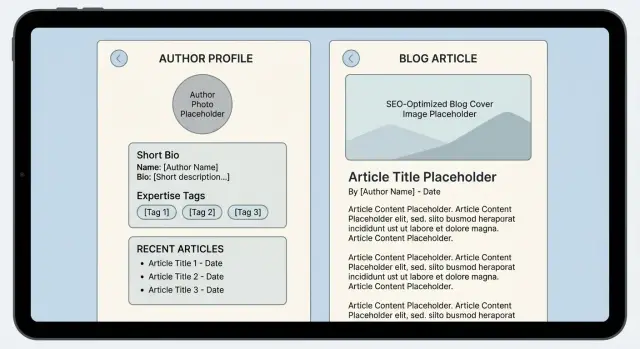
Treat author pages like a profile card with the same structure everywhere. A reader should understand who wrote the piece, why they know the topic, and what else they cover in under 10 seconds.
1) Write a bio that answers three questions
Keep it around 60 to 90 words. What is their role, what do they know, and what do they write about here?
Example: "Jordan Lee is a nutrition coach who helps busy parents plan simple meals. On this blog, Jordan writes about grocery planning, balanced snacks, and realistic habits. Each post is reviewed for practical steps you can try this week."
2) Lock in topics and labels
Pick 3 to 5 topic areas per author and keep them stable. Use the same wording on the author page and in the article attribution.
3) Standardize bylines and attribution blocks
Use one byline pattern and one attribution block across the site.
A simple setup:
- Byline: author name + short role
- Attribution block: short bio + topics + review/update line
- Author page: full bio + recent posts + contact or editorial note (optional)
If you publish via a CMS or API, bake this into templates so every post defaults to the same structure.
4) Add review and update statements people can read quickly
Keep the formatting consistent. If nothing changed, don't add a new update date.
5) Do a fast mobile scan
Check the author page on a phone. Name, role, and topic focus should appear near the top. Don't bury the bio under badges or long timelines.
Common mistakes that undermine author trust
Small choices can quietly weaken credibility.
Exaggeration is the fastest way to lose confidence. Inflated titles, vague claims ("10+ years" with no detail), and trophy-style lists feel like padding. A short, specific bio beats a long one.
Another common issue is hiding behind a brand name without context. "By Marketing Team" isn't always wrong, but it needs an explanation. If a post is a group effort, say who led it and who reviewed it. If one person wrote it, use their name.
Don't mix multiple people into one profile page. It muddies accountability and makes attribution hard to believe.
Consistency problems add up: initials on one post, a full name on another, and a nickname on a third. The same goes for job titles and "About the author" snippets that don't match the main profile.
Quick checklist before you publish
Do a fast trust pass before publishing:
- Bio explains what the author does day to day and why they write about the topic
- Byline format matches everywhere the name appears
- Readers can easily find more work by the same author
- Review/update notes (if you use them) follow the same format on every post
- Photo, tone, and credentials feel consistent with the site
A simple reality check: open the author page in a private window and ask someone outside your team what the author actually does. If they can't answer in one sentence, rewrite the first two lines.
Example: cleaning up authorship on a small company blog
A small SaaS team has three regular writers (founder, marketer, support lead) plus a few guest posts each quarter. Traffic is growing, but readers keep seeing mismatches: "By Sam" on one post, "Samuel K." on another, and guest pieces attributed only to the company.
They fix it by creating one author template and applying it everywhere: a short, plain-language bio, day-to-day role, topic focus, and a brief note on review.
In one afternoon, they:
- Choose one display name per author and use it on every post
- Create one author page per writer and connect all articles to it
- Define guest attribution (guest writer + staff editor/reviewer where relevant)
- Add a one-sentence review note to advice posts
- Update older posts so the byline location and format match the new standard
They keep it light. The bio stays focused on why the person is qualified for the topic, not a full career story.
Next steps: keep it consistent as you publish more
Start with one author template and stick to it. Apply it to new posts first so you stop creating fresh inconsistencies, then work backward through older content in small batches.
If you publish at scale, consistency often turns into a tooling problem. GENERATED (generated.app) is one option for serving standardized author metadata via API alongside your content, with support for content polishing and translations so author identity and attribution stay consistent across formats and languages.
Even without automation, one clean source of truth for author data prevents version drift, and it pays off every time a reader checks who's behind the words.
Frequently asked questions
Why do author pages matter for trust?
Because readers look for quick proof that a real, accountable person stands behind the content. A clear author page reduces doubt even before someone evaluates the writing itself.
What should a good author page communicate quickly?
Aim for something a reader can grasp in about 10 seconds: who the author is, what they do day to day, why they know this topic, and how their work is reviewed or updated. The goal is clarity, not a full resume.
What’s the simplest bio format that works?
Use one tight paragraph that includes the author’s role, what they actually do, what they cover on the site, and one relevant proof point (like years in the role or a specific certification). Keep it specific and easy to believe.
What should I avoid putting in an author bio?
Skip hype that can’t be checked, long unrelated skill lists, personal details that don’t support the topic, and keyword-stuffed bios reused across authors. If it reads like an ad, it usually lowers trust.
How do I show expertise without sounding promotional?
Lead with concrete experience and outputs. A job title alone is vague, but describing the type of work they do (testing, editing, client work, research) makes the expertise feel real without sounding salesy.
Which credentials are worth mentioning on an author page?
Add only credentials that are current and relevant, and phrase them plainly so a reader understands them without extra context. One or two clear items usually beat a long list that looks like padding.
How should I handle reviewer information?
State the role and what was checked, not just a name. A short line like “Reviewed by an editor for clarity and accuracy” can help, especially for advice content, as long as it’s true.
What’s the right way to add update notes?
Show publish date, then only use “Last updated” when something meaningful changed (facts, steps, recommendations). If you update, add a one-sentence note about what changed so the freshness doesn’t feel fake.
How do I keep bylines consistent across the site?
Use one person equals one profile, pick a single byline format, and connect every post to the same canonical author record. If someone changes roles, update the profile instead of creating a new one with a slightly different name.
If AI helped write the post, should I disclose it on the author page?
Be direct about what AI did and what the human did. A simple statement that the draft was AI-assisted and then edited and checked by a named role or author is usually enough to keep accountability clear.