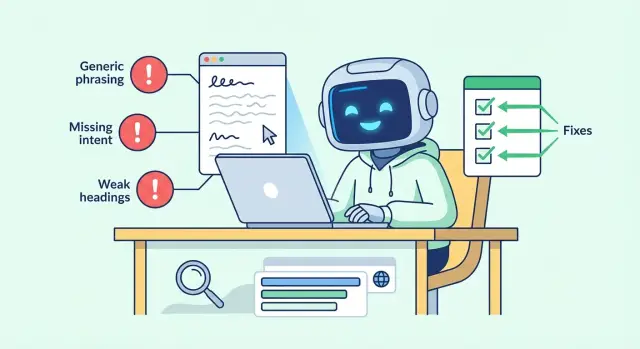
Why AI-generated pages often rank poorly
When an AI-written page underperforms, it usually shows up as a pattern, not a single ranking drop. You might see impressions without clicks because the snippet feels generic. People land, skim, and leave because the page doesn’t answer the question quickly. Time on page is short, scrolling is shallow, and rankings jump around instead of settling.
AI drafts can sound smooth and confident while still missing what the searcher wants. They often cover a topic “in general” instead of helping someone solve a specific problem. If someone searches “best running shoes for flat feet,” they’re not asking for a history of running shoes. They want options, trade-offs, and clear guidance.
Small wording and structure habits also signal low value. If the opening repeats the title, if headings are vague (“Introduction”, “Conclusion”), or if every sentence could live on any website, readers feel it right away. Search engines see it indirectly through behavior and by comparing your page to other pages that satisfy the query better.
The good news: most SEO issues in AI drafts are fixable without starting over. Keep the draft, then tighten it so it matches intent, has a clear structure, and includes specifics.
What usually moves the needle fastest is simple:
- Replace generic claims with specific, checkable details.
- Make headings say what the reader will get.
- Add a clear angle (who it’s for, when to use it, when not to).
- Answer the next obvious question before the reader has to hunt for it.
Pattern 1: Generic phrasing that says nothing
A lot of AI content reads “professional” but leaves the reader with no new information. It adds words, not value. That shows up in behavior: people bounce, don’t scroll, and don’t get their question answered.
Generic lines often appear in the most important places: the first paragraph and the last paragraph. If your intro is vague, readers never reach the useful part. If your ending repeats the same idea, it wastes the final chance to help.
Common filler lines include:
- “There are many factors to consider when it comes to SEO.”
- “This topic is important for businesses of all sizes.”
- “The key is to find what works best for you.”
- “With the right approach, you can see better results.”
Another red flag is excessive non-committal wording. Words like “often,” “generally,” “may,” “can,” and “in some cases” are fine when you’re describing real uncertainty, but AI drafts lean on them to avoid being wrong.
A practical fix: make every paragraph answer a real question. Ask:
- What exactly should the reader do next?
- What number, timeframe, or example makes this real?
- What common mistake happens here, and what does “good” look like?
- How would you explain it in plain words to a friend?
Example: change “Headings are important for SEO” to “Use one clear H1 that matches the query, then 3 to 6 H2s that mirror the exact questions readers ask (cost, steps, mistakes, examples).” That gives the reader a structure they can use immediately.
Pattern 2: Missing or mismatched search intent
You can cover the “right” topic and still miss what the reader wants. That’s the core failure in many AI drafts: the text circles a keyword but doesn’t help someone finish a task or make a decision.
A simple intent test is: “What decision is the reader trying to make after this search?” If the page doesn’t move them closer to that decision, it feels unsatisfying even if it’s well-written.
Intent types in plain terms
Most queries fall into three buckets:
- Informational: “teach me” (definitions, explanations, steps)
- Commercial: “help me choose” (comparisons, pros/cons, what to look for)
- Transactional: “help me do it now” (pricing, how to buy, booking, templates, downloads)
A common mismatch is a page titled “Best email marketing tools” that mostly explains what email marketing is. The searcher wanted a shortlist and selection criteria.
Signs you answered the wrong question:
- The intro takes too long to say what the page will help with.
- The page has no clear “next action” (pick, compare, start, fix).
- You ignore constraints people care about (budget, time, skill level, location).
- Examples are interchangeable and could fit any query.
- The ending fades out instead of helping the reader decide.
To fix it, add intent signals that match the query. For informational searches, include a tight definition, a simple step-by-step, and one realistic example. For commercial searches, add a quick comparison and recommendations for different needs (beginners, small teams, tight budgets). For transactional searches, make the path obvious: what to prepare, what to expect, and what to do next.
Example: if someone searches “AI content editing checklist,” they likely want a usable checklist and a sense of how strict to be. Give them both: a short checklist plus a few “if your goal is X, focus on Y” notes.
Pattern 3: Weak headings and confusing structure
A page can look organized at a glance but fall apart when someone tries to skim it. Vague, repetitive, or poorly ordered headings make readers bounce and make it harder for search engines to understand what the page is really about.
What weak headings look like
Weak headings reuse the same idea with different labels (“Overview”, “More information”, “Final thoughts”). They hide the real topic behind words that could fit any page. Another issue is broken hierarchy: unrelated H2s stacked like separate mini-articles, or H3s that introduce brand-new topics that should be H2s.
Headings do two jobs: they help people scan and decide whether to keep reading, and they help search engines map sections to specific queries. If a heading doesn’t set expectations, the section under it usually turns generic too.
How to fix your heading map
List the reader’s questions in the order they’d naturally ask them, then turn those questions into headings that promise a clear answer. A simple rule works well: each H2 covers one major question, and each H3 supports that H2 with a smaller question.
Examples of headings that make the page easier to skim:
- H2: “What counts as thin content (and why it fails)”
- H2: “How to match search intent: informational vs transactional”
- H3: “Signs the query wants steps, not definitions”
- H3: “What to include in a ‘best X’ page to earn clicks”
- H2: “A practical editing checklist for AI drafts”
Edit headings before you polish sentences. When the map is clear, the writing usually gets clearer too.
Pattern 4: Thin answers and missing specifics
“Thin” content isn’t just short. It’s content that avoids making decisions. It talks around the topic but gives no examples, no clear steps, and no boundaries like “this works when X, but not when Y.” Readers leave because there’s nothing they can use.
AI drafts often go thin in predictable ways: they skip numbers (ranges, limits), time (how long something takes), tools (what you actually use), and trade-offs (what you gain and what you give up). The page can sound “complete” while still failing to help someone act.
A simple fix is to add one concrete example to each key point. Keep it plain. Instead of “optimize your title,” write: “If your page targets a how-to query, make the title promise the outcome: ‘How to write a product description that converts (with a 10-minute template).’”
To thicken a thin paragraph without bloating it, add one of these:
- A constraint (who it’s for, who it’s not for)
- A number (a range, limit, or time estimate)
- A format (checklist, template, spreadsheet)
- A trade-off (what you gain, what you risk)
- A mini example (2 to 3 sentences)
Sometimes the best move is to cut. If a section can only repeat what you already said, remove it. If you can’t add a clear example or decision, it’s likely filler.
Pattern 5: Same-as-everyone content with no clear angle
If your page could belong on any site, it’s hard to earn clicks and harder to keep readers. You can spot copycat content by its safe advice, lack of trade-offs, and refusal to choose. If it avoids numbers, examples, and a point of view, it reads like a summary of other summaries.
Original value doesn’t require secret data. It can be as simple as choosing a specific audience and making decisions for them. Your “angle” is your context: constraints, priorities, and recommendations.
A fast way to create an angle:
- Pick one audience (beginners, busy teams, local businesses, in-house marketers).
- Add constraints (small budget, no developer help, one-week deadline).
- Make trade-offs explicit (what to do first, what to skip, what’s optional).
- Use a concrete scenario that matches the page goal.
- End with a specific next step (what to do in the next 30 minutes).
A rewrite pattern that stays useful is: claim, reason, example, next step. The claim is the recommendation. The reason explains why it’s true. The example shows it in real life. The next step tells the reader what to do.
Example: Instead of “Create high-quality content consistently,” write: “Publish one helpful update every week for the exact query you want to rank for. This works because freshness and focus help search engines understand the page topic. For example, if you sell accounting services, write one page per problem (late tax filing, quarterly payments) and add a short checklist from real client questions. Next, open your draft and replace the first three generic sentences with one clear promise and one specific use case.”
How to correct AI drafts: a simple editing workflow
AI gives you speed. Rankings improve when you add intent, structure, and specifics. If you only do one thing, make the page answer one clear question better than the other results.
Start with a one-sentence intent statement: who it’s for, what they want, and what “done” looks like. Example: “Help small business owners spot common SEO mistakes in AI-generated content and fix them in under an hour.” Use that sentence as a filter for what stays and what gets cut.
Then build the page from real reader questions. If you can’t list at least five good questions, the draft is probably too vague.
A workflow that holds up across most topics:
- Lock the intent: write the one-sentence intent at the top and keep it visible.
- Build headings from questions: list 5 to 8 questions, then turn them into clear H2/H3 headings.
- Swap “general” for “useful”: replace generic lines with concrete actions, numbers, tools, and a small example.
- Write a tight ending: summarize in 2 to 3 sentences and give one next action.
- Do a final quality pass: remove repetition, shorten long sentences, and make the page easy to scan.
A quick way to add specificity is to write for one realistic scenario. Example: “You published 10 AI-written posts last month. Traffic is flat. Rewrite the intro to match intent, then update headings to mirror the questions people actually type.”
Quick pre-publish checklist
Before you hit publish, do one fast pass focused on what readers and search engines both reward: clear intent, clear structure, and real value.
Use this as a final gate:
- First-screen intent: read only the title, first paragraph, and first visible subheading. Would a searcher instantly feel “yes, this answers my question”? If not, rewrite the opening to name the problem and promise a specific outcome.
- Headings-only test: scroll and read only H2/H3 headings. Can you understand the page without the paragraphs? If a heading is vague, rename it to what the section actually delivers.
- Concrete detail per section: in every main section, include at least one specific (a number, a step, a time estimate, a clear definition, or a “do this, not that” rule).
- One realistic example: include a small scenario that matches the query (for “heading structure SEO,” show a simple H2/H3 outline and explain why it works).
- Cut repeats: delete any paragraph that restates the previous one.
Read the page out loud once. If you hear filler, long sentences, or empty claims, tighten them.
Common traps when fixing SEO issues
When you fix AI-written pages, it’s easy to overcorrect. The goal isn’t to “sound more SEO.” The goal is to answer the query clearly in a way that feels written for a person.
A common trap is keyword stuffing: forcing the main phrase into every paragraph and swapping in awkward synonyms until the page reads like a template. A simple test helps: if you wouldn’t say the sentence out loud, rewrite it.
Another trap is editing into corporate language. People swap plain words for vague ones (“optimize,” “utilize,” “enhance”) and remove the helpful specifics. Clarity beats polish.
Adding too many sections is a quieter ranking killer. If a section doesn’t help the reader complete the task the query implies, cut it or move it to a separate page.
A quick way to catch these issues:
- Read only the headings. Do they tell a clear story and match the page’s promise?
- Read the intro and ending. Do they agree on what the page is about?
- Search for repeated phrases. Do they sound forced?
- Check the title and meta after edits. Do they match the final focus?
- Do one last human read for tone and factual accuracy.
Example: you start with a draft targeting “email subject line examples,” then add a long section about email automation tools. Now the page feels split. The fix isn’t more keywords. It’s deciding the page is about examples, trimming the tool section, and updating the title/meta to match.
Example: Turning a weak AI draft into a useful page
A weak draft usually fails in the same ways: it opens with broad statements, guesses at intent, and uses headings like “Introduction”, “Key points”, and “Conclusion”. It reads smoothly but doesn’t help.
First, write one plain intent statement, then build a heading map that matches it. Example: “Help a marketer fix AI-written blog posts that aren’t ranking by spotting the patterns and editing them fast.” Now your headings can be specific, like “How to tell the page misses search intent” and “A rewrite checklist for one paragraph.”
Here’s a before-and-after rewrite of a small section.
Before (generic):
“AI content can help you create articles quickly. To rank well, you should focus on quality, keywords, and readability. Use headings to organize your content and make it engaging for readers.”
After (specific):
“If someone searches ‘why my AI blog post isn’t ranking’, they want fixes, not motivation. Add one sentence that names the problem (generic phrasing, wrong intent, weak headings), then give a short checklist they can apply in 10 minutes. Replace vague advice like ‘focus on quality’ with concrete actions: state the target query in the intro, answer it in the first 5 lines, and make each H2 a question the reader would actually ask.”
What’s worth keeping from an AI draft is usually the raw material: a rough outline, a few decent examples, and any accurate definitions. What’s worth cutting is filler and anything that could fit on any page.
A page is “done enough” to publish when:
- The intro states who it’s for and what problem it solves.
- Every heading promises a clear answer (and the section delivers it).
- At least one example shows the exact edit you want readers to copy.
- Repeated “everybody knows” sentences are gone.
- You can skim the H2s and understand the full page in 20 seconds.
Next steps: build a repeatable AI content QA process
Treat AI drafts like raw material and build a simple QA loop that catches problems before they reach your site.
1) Standardize the brief and the page shape
Start with a one-page template every article follows. Keep it short, but specific enough that different writers (or prompts) produce consistent results: the primary query, a few related queries, a note on search intent, a clear heading pattern, and a short “must include” list (examples, constraints, tools, ranges) plus a QA checklist.
This alone prevents vague intros, off-topic sections, and headings that don’t answer anything.
2) Build a production pipeline, not one-off edits
Use one workflow to generate drafts, then run a consistent editing pass: tighten wording, replace generic phrases with concrete details, and make sure each H2 delivers a clear takeaway. If you publish often, consistency is the biggest win.
If you want that pipeline to be easier to manage, a platform like GENERATED (generated.app) can support draft generation and polishing, plus practical extras like CTA generation and performance tracking and faster indexing via IndexNow-style submissions. Even with tooling, the deciding factor is still editorial: intent, structure, and specifics.
Frequently asked questions
Why do my AI-written pages get impressions but not clicks?
Most of the time it’s not a penalty; it’s that the page doesn’t satisfy the query as well as competing results. AI drafts often feel generic, miss the real intent, and don’t give specifics people can use, so readers bounce and rankings don’t settle.
What’s the fastest fix if my AI page feels generic?
Make the first screen do the work: state the problem, who the page is for, and what outcome they’ll get. Then answer the main question in the first few lines and make your first subheading clearly match what they searched for.
How can I tell if my page is missing search intent?
Ask what decision the searcher is trying to make after typing the query. If your page doesn’t help them choose, do, or fix something, you’re missing intent even if you mention the keyword a lot.
How should I write differently for informational vs commercial vs transactional queries?
Informational queries need a clear definition, steps, and a real example. Commercial queries need comparisons, trade-offs, and recommendations by situation. Transactional queries need a clear “do it now” path, like what to prepare, what to expect, and the next action.
What headings work best for AI-generated blog posts?
Replace vague headings like “Introduction” with headings that promise a specific answer. A good default is to make each H2 a question the reader would actually ask, and keep the order in the same order they’d think through the problem.
What does “thin content” mean if my article is already long?
Thin content avoids decisions and specifics, even if it’s long. Add at least one concrete detail per main section, like a number, a timeframe, a tool, a constraint (who it’s for), or a short example the reader can copy.
Should I throw away an AI draft that isn’t ranking?
Yes, if the draft gives you useful raw material like a rough outline or a few accurate definitions. Keep what’s correct, then rewrite the intro for intent, rebuild the headings around real questions, and replace filler paragraphs with specific actions and examples.
Is it bad if my AI content uses words like “often” and “generally” a lot?
Overuse of non-committal words like “may,” “generally,” and “in some cases” can make the page feel like it’s avoiding the answer. Keep uncertainty only where it’s real, and otherwise choose a clear recommendation and support it with an example.
Will adding more keywords help an AI page rank?
Keyword stuffing usually makes the writing awkward and less helpful, which hurts engagement. Use the main phrase naturally where it clarifies the topic, then focus on answering the query well with clear sections, specific details, and a strong opening.
What’s a quick pre-publish QA checklist for AI content SEO?
Do three quick checks: read only the title, intro, and first subheading to confirm the promise is clear; read only the H2/H3s to see if the structure tells a complete story; and ensure every main section has one specific detail and at least one realistic example.